The problem this solves
Here is the contractor who needs this. You leave the Ferguson counter at 7:42am with two PVC fittings, a length of pipe, and a receipt. You stuff the receipt in the cup holder because the next stop is the jobsite and the truck is already running late. At lunch the receipt has slid under the seat. At end of day there are six more like it spread between the dash, the toolbox, and your back pocket.
On Friday your office person asks for the week's job costs. You hand over a paper bag. Three receipts are missing. Two are from gas stations and you can't remember which job. One is for a permit and you forgot to charge the customer for it. The profit per job report you ran on Monday is fiction because half the costs never made it into the app.
The duct-tape fix is a manual data entry session at the end of the week. It takes 45 minutes. You do it twice, then stop. By month three the receipts are back in the glove box and you are guessing your margin again.
How Workhand handles it
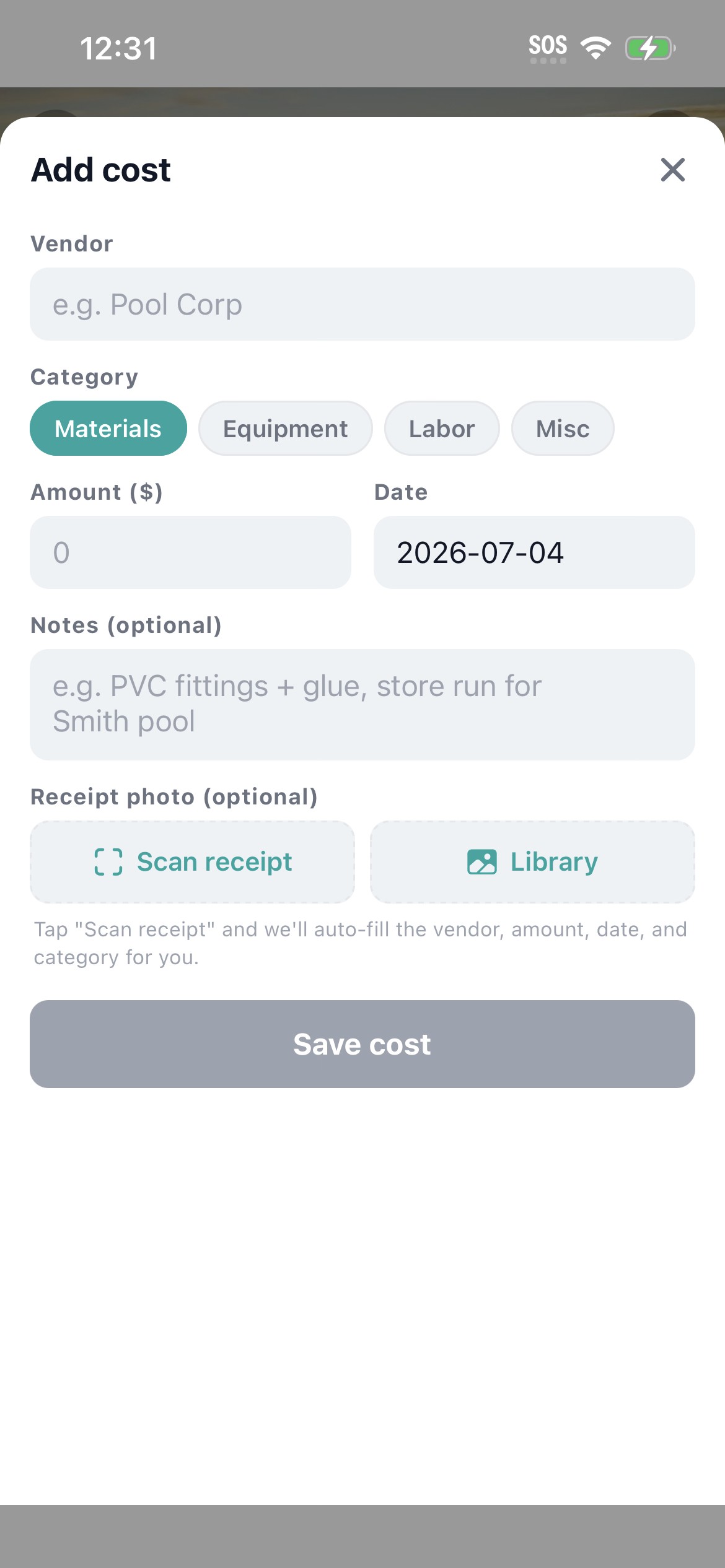
Inside any job, tap into the Costs tab and you see a Scan receipt button. Tap it. The camera opens. Point at the receipt on the truck seat or the kitchen counter or wherever it landed. Snap.
What happens next is the new part. The image goes to a backend Edge Function that runs Anthropic Claude vision OCR. Within a couple seconds the Add Cost form populates with the vendor name, the amount, the date, and a best-guess category. A small confidence indicator shows up if the OCR is unsure about a field. You glance, fix anything wrong, tap Save. The job cost lands in Workhand with the receipt image attached as a thumbnail.
If you have QuickBooks Online connected, the cost flows into QBO automatically. Vendor, amount, date, category all map through. No second data entry. The receipt image stays in Workhand as the audit backup.
| What you get | How it works |
|---|---|
| Camera receipt capture | One-tap Scan receipt button inside any job's Costs tab. Camera opens immediately. |
| AI vision OCR | Anthropic Claude reads the receipt and extracts vendor, amount, date, and category in seconds. |
| 12 cost categories | Materials, Equipment, Labor, Misc, Permit, Disposal, Equipment Rental, Subcontractor, Fuel, Travel, Office, Other. Auto-classified from the receipt. |
| Confidence indicator | Shows when the OCR is unsure about a field so you know to double check before saving. |
| Manual edit before save | Every field stays editable. Nothing saves until you tap Save. |
| Receipt image stored | The photo lives on the cost row as a thumbnail. Tap to view full size for audits and 1099 backup. |
| QuickBooks Online flow | If QBO is connected, the cost rolls into QuickBooks automatically. No second entry. |
| iOS and Android | Same workflow on both platforms. Same cloud sync. |
Why this beats typing costs in by hand
Most contractors do not skip cost tracking because they don't believe in it. They skip it because the data entry is painful enough that it falls off the priority list by Wednesday. Three specific things change when the receipt scanner does the work:
- Profit per job stops being fiction. When 95 percent of costs make it into the right job instead of 50 percent, the margin number you look at every Friday is actually true. You stop bidding the next pool $4,000 too low because last year's pool actually cost $9,400 in materials not $5,400.
- February audits become a search bar, not a paper bag. The IRS or your accountant asks for receipts for the year. You filter your Workhand cost ledger by job or by date range and every receipt is there as an image. The audit trail is built into the workflow instead of bolted on at year-end.
- QuickBooks stops being two systems of record. When the receipt scanner pushes through to QBO automatically, you stop reconciling two places. The receipt image stays in Workhand for evidence, the line item lives in QBO for accounting, and the cost row is the single source of truth in both.
Why vision OCR beats receipt-upload bots
QuickBooks and Expensify both have receipt-upload features. They are not bad. They are tuned for office workers and CFOs filing T&E expenses, not contractors logging job costs in the truck cab.
Three differences matter for contractors. First, Workhand reads the receipt from a phone photo, not an emailed PDF. You do not need a vendor portal or an email-in inbox. Second, the cost lands tied to a specific job from the start, not in a generic expense pile that you have to re-categorize later. Third, the supply-yard receipt formats from Home Depot, Lowes, Ferguson, and Pool Corp are exactly the receipts a vision model handles well, which is the opposite of what office expense tools have been optimized for.
The blunt version. If you spend most of your day on jobsites, the receipt scanner that lives inside your job costing app beats the one that lives inside your office accounting app.
Who this is built for
- Pool builders hitting Pool Corp, Home Depot, and three local supply yards for one build
- Remodelers running constant supply runs across kitchen, bath, and addition jobs in the same week
- HVAC service techs who hit Ferguson or a local HVAC distributor mid-call and need the part on the right service order
- Solar installers tracking panel and inverter purchases against specific install jobs
- Subs and trade contractors who eat their own material costs on cost-plus jobs and need the receipts to back the invoice
- General contractors with field PMs running the supply chase for multiple jobs at once
Try Workhand free
Free plan includes the receipt scanner and 1 active job. Upgrade to Pro at 34.99 per month for unlimited jobs, or Team at 89.99 per month for up to 15 users. 14-day free trial on paid plans.
Get the app See pricingCommon questions
What is the best receipt scanner app for contractors?
A good receipt scanner for contractors does three things. It captures the receipt with the phone camera, reads vendor and amount accurately on supply-yard receipts like Home Depot and Ferguson, and ties the cost to a specific job. Workhand does all three in one tap from inside the Costs tab of any job. Vision OCR runs on the image, the cost row gets created, and the receipt image gets stored next to it for the audit trail.
Does the Workhand receipt scanner work with QuickBooks Online?
Yes. Once you flip on the QuickBooks Online sync in Settings, every cost created from a scanned receipt flows into QBO automatically. Vendor, amount, date, and category map straight through. No copy paste. No second tool. The receipt image stays in Workhand as the backup, the line item lands in QBO for accounting.
How accurate is the AI receipt OCR?
Workhand uses Anthropic Claude vision OCR, which reads clear vendor receipts with high accuracy and surfaces a confidence indicator when it is unsure. The amount and date are nearly always correct on standard supply-yard receipts. Vendor name is reliable on the major chains. Category is a best guess from line items and is always editable before save. Wrinkled or faded receipts get a lower confidence flag so you know to double check.
Can I scan receipts from any vendor or just Home Depot and Lowes?
Any vendor. Workhand reads the receipt itself, not a database of known vendors. Home Depot, Lowes, Ferguson, Pool Corp, local supply yards, the gas station up the street, even handwritten receipts from a one-truck supplier. The OCR pulls what is on the paper. If a vendor uses an unusual receipt format and the confidence comes back low, you edit before saving and the next one trained against your edits gets closer.
What if the OCR misreads the amount or the vendor on my receipt?
The scanned values land in the same Add Cost form a manual entry would use, with every field editable. Wrong vendor, fix it. Wrong amount, fix it. Wrong category, tap a different one. Nothing saves until you tap Save. The receipt image stays attached either way so the audit trail is intact even if you typed the dollar amount yourself.
Does the receipt scanner cost extra on Workhand?
No. The receipt scanner is included on every plan, including Free. There is no per-scan fee, no monthly add-on, no tiered limit on scans per month. Pro at 34.99 per month and Team at 89.99 per month unlock unlimited jobs and more users, but the scanner is the same on Free.
Can I scan a receipt hours after the purchase or only at checkout?
Either. The most common use case is at the truck after leaving the supply yard, before the receipt ends up in the glove box. The second most common is end-of-day cleanup, when the contractor sits down with a stack of paper receipts and scans them all into the right jobs. The image just needs to be readable. Tomorrow morning works fine.
Where does Workhand store the scanned receipt image?
Receipt images are stored in Workhand's Supabase storage layer alongside the cost row. The image is private to your company and only accessible to users on your team with permission to see costs. It shows as a thumbnail on the cost row and opens full-size on tap, so February audits, 1099 backup, and customer questions about a charge all get the same answer in two taps.