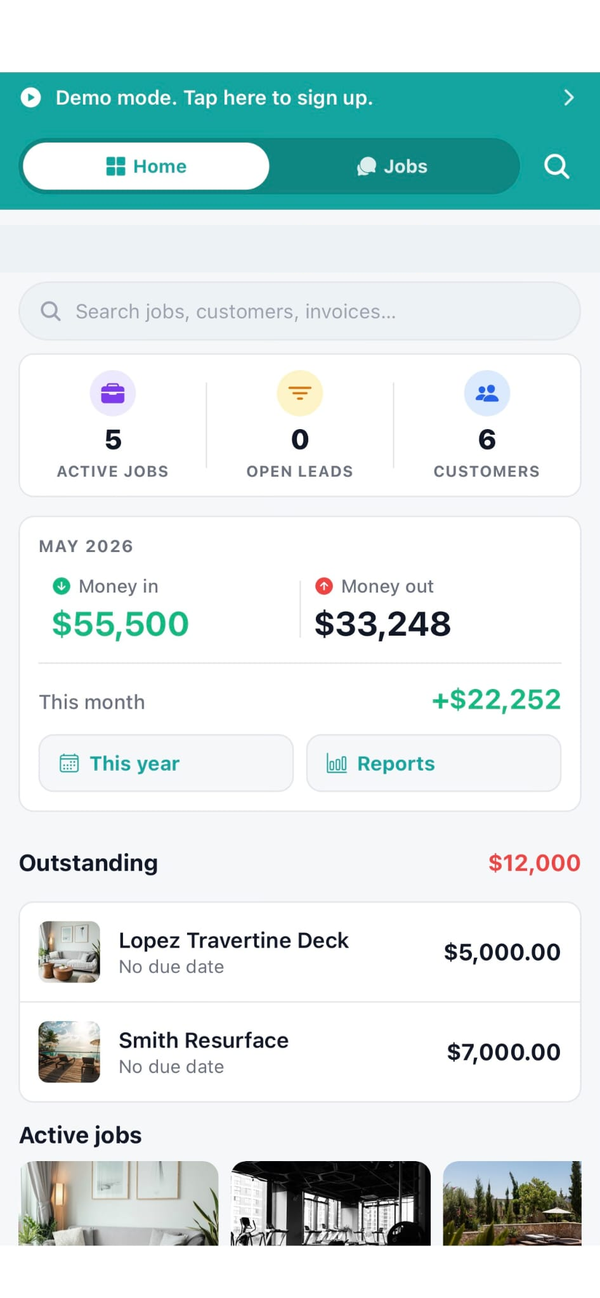
Feature · Accounting Integration

QuickBooks Online Sync, Built for Small Construction Crews

Customers, jobs, and invoices sync both ways with QuickBooks Online. No migration. No double entry. No fight with your bookkeeper. Layer Workhand on top of QBO so the field crew gets their tool and the books stay where they have always been. Included on the Team plan at 89.99 per month for up to 15 users.

Get Workhand free See pricing
Quick answer: Workhand connects to QuickBooks Online with bidirectional sync. Customers, jobs and projects, and invoices flow both ways automatically. No CSV exports, no manual matching, no replacing QBO. Included on the Team plan at 89.99 per month, which also unlocks Stripe Connect payments at 0 percent platform markup (you pay Stripe's standard 2.9 percent plus 30 cents).

The problem this solves

Most construction software hands you the same false choice. Option one, replace QuickBooks Online entirely. The vendor wants you to migrate the whole shop, fight your bookkeeper, rebuild the chart of accounts, and trust their accounting module is as battle-tested as the one Intuit has had since 1983. It is not. Option two, skip the integration. The vendor offers no real sync, so you live with double entry. The crew updates jobs in the app, the bookkeeper retypes the same data into QBO, invoices go out late, and the numbers in the two systems drift apart every week.

Both options are the same problem in different wrappers: the software vendor wants to own your accounting and your operations, and the contractor pays the price in lost time and angry bookkeepers.

Workhand picks the third option. QuickBooks Online stays. Your bookkeeper stays. Your CPA stays. Your years of historical financials stay. Workhand layers on top for the parts QBO is bad at: estimating in the field, jobsite chat, scheduling, photo logs, COI tracking, customer portals. The two systems talk. The bookkeeper keeps doing what they have always done. The crew gets a tool built for them.

How Workhand handles it

You connect your QuickBooks Online account once through Intuit's official OAuth flow. From that point Workhand watches for changes in either system and propagates them automatically.

A customer added by the office in Workhand appears in QBO within minutes. A customer added by the bookkeeper in QBO appears in Workhand the same way. Same for jobs and projects. Same for invoices, including line item detail. Payments recorded in either system update status in the other. The sync is automatic, runs in the background, and does not require anyone to click a button or download a CSV.

If a record is edited in both systems between syncs, the most recent change wins, with a clear audit log showing what changed where and when. The conflict cases are rare in practice because QBO is the bookkeeper's surface and Workhand is the field's surface, so the same record is almost never edited from both sides at the same time.

What you getHow it works
Bidirectional syncChanges in either Workhand or QBO propagate to the other system automatically.
Customers syncName, email, phone, billing address sync both ways. Add once, see everywhere.
Jobs and projects syncJob records map to QBO projects so revenue can be tracked per job in both surfaces.
Invoices syncFull invoice with line items and totals flows both directions. Payment status syncs back.
No migration requiredQBO stays the system of record for accounting. Your chart of accounts is untouched.
Automatic background syncNo manual exports. No buttons to click. Records propagate within minutes.
Stripe Connect at 0 percent markupCard and ACH payments through the customer portal. You pay Stripe's 2.9 percent plus 30 cents, nothing more.
Included on Team plan89.99 per month for up to 15 users. Pro and Free plans do not include QBO sync.

Why this matters more than a flashy estimating module

Plenty of construction software demos look great in the sales call and turn into a nightmare three months later when the bookkeeper realizes the numbers do not match QBO. Workhand designed for the bookkeeper from day one. Four specific reasons that decision compounds:

  1. You do not lose your CPA and bookkeeper. Forcing a QBO migration usually costs the existing accounting relationship. That relationship is worth more than any single piece of software. Keeping QBO keeps the team.
  2. Historical reporting stays intact. Year-over-year comparisons, tax history, banker reports, all of it lives in QBO. Migration breaks the continuity. Sync preserves it.
  3. Onboarding is days, not weeks. No data import. No staff retraining on accounting. The crew learns Workhand, the bookkeeper keeps QBO. Time to value is measured in days.
  4. The pricing matches the reality. 89.99 per month for the Team plan, 14-day free trial, no per-transaction Stripe markup. Compare that to construction platforms that charge 99 to 199 per month and add 1 to 3 percent on top of card processing.

Who this is built for

Try Workhand free

Free and Pro plans let you run Workhand without QBO sync. Team plan at 89.99 per month adds bidirectional QuickBooks Online sync for up to 15 users. 14-day free trial on every paid plan.

Get the app See pricing

Common questions

How does the Workhand QuickBooks Online integration work?

You connect your QuickBooks Online account once. From that point Workhand syncs customers, jobs and projects, and invoices in both directions automatically. A new customer added in Workhand shows up in QBO. A new invoice paid in QBO updates status in Workhand. No CSV exports, no manual matching.

Do I have to migrate my data out of QuickBooks?

No. That is the entire point. QuickBooks Online stays the system of record for accounting. Your bookkeeper keeps doing what they have always done. Workhand layers on top for the operational side, estimating, jobsite chat, scheduling, photo logs, COI tracking, and the field crew gets their own surface without disturbing the books.

What data syncs between Workhand and QBO?

Customers (name, email, phone, billing address) sync both ways. Jobs and projects sync both ways. Invoices with line item detail sync both ways. Payments recorded in either system update status in the other. Vendor and inventory sync is on the roadmap and not in v1.

Which Workhand plan includes QuickBooks sync?

QuickBooks Online sync is included on the Team plan at 89.99 per month for up to 15 users. Pro at 34.99 per month and the Free plan do not include accounting sync. The Team plan also unlocks Stripe Connect payments at 0 percent platform markup, so you only pay Stripe's standard 2.9 percent plus 30 cents per transaction.

How often does the sync run?

Sync runs automatically in the background. You do not click a button to trigger it. New records propagate within a few minutes. Updates to existing records propagate the same way. If a record is edited in both systems between syncs, the most recent change wins with a clear audit log.

Will my bookkeeper still be able to do their work in QBO?

Yes. The bookkeeper's workflow does not change. QBO is still their software. The chart of accounts stays in QBO. Reconciliation stays in QBO. Tax prep stays in QBO. Workhand simply makes sure the operational data the field generates lands in QBO without the bookkeeper having to retype it.

Does Workhand replace QuickBooks?

No. Workhand is built to complement QBO, not replace it. Construction software that forces you to abandon QBO creates a fight with your bookkeeper, your CPA, and your historical financial data. The Workhand approach is that QBO is great at accounting and bad at jobsite operations. Use each where it is strong.

What about Stripe payments through Workhand?

Workhand integrates Stripe Connect so customers can pay invoices by card or ACH directly in the customer portal. The platform markup on top of Stripe's standard fees is 0 percent. You pay the same 2.9 percent plus 30 cents Stripe charges everyone else. Payments sync back to both Workhand and QBO automatically.