Home › For Concrete Contractors
For Concrete Contractors

Concrete software for deposits, weather, pour logs

Workhand is the field-ops app for concrete contractors. Driveways, patios, foundations, slabs, sidewalks, decorative work. Collect a deposit before you mobilize ready-mix trucks and a formwork crew. Schedule pours against a 7-day weather forecast. Document pour quality with phase-tagged photos for the homeowner record and the warranty file. Track finishing subs and their insurance separately from your own labor. Built around the cash-flow and weather realities of concrete work.

Start free, no credit card See pricing
Download on the App Store Get it on Google Play

Free plan to start. 14-day free trial on Pro and Team. No card needed for Free.

Built around the cash flow and weather of concrete

Concrete work has two structural problems that almost no generic contractor app handles well. First is cash flow. The day a driveway pour goes in, you owe the ready-mix supplier for the yardage, the pump truck operator, the rebar supplier, and your formwork and finishing crews. That's serious money out the door before the homeowner ever sees a finished slab. If you don't have a real deposit in hand before trucks roll, you are floating the project on your line of credit and praying nothing goes wrong. Second is weather. A pour that goes in at 38 degrees with a sustained wind cures different than the same mix at 65 degrees in still air. Rain on a fresh pour is a disaster. You cannot schedule concrete like you schedule cabinets.

Workhand was built with both in mind. The estimate sets the deposit (percentage or flat dollar amount) and the customer pays the deposit through Stripe Connect when they sign the estimate, before any trucks are scheduled. The job runs in phases (site prep, formwork, rebar, pour, finish, cure, cleanup) with progress invoices firing automatically at phase completion for larger foundation work. The schedule view shows the 7-day forecast next to the calendar with rain probability, high and low temperatures, and wind so you can move a pour off a bad-weather day before you've committed the supplier. Photos auto-tag by phase so the warranty file is built as the work happens, not reconstructed eighteen months later when somebody calls about a crack.

Workflows we cover

The day-to-day motions of a working concrete contractor, from yardage estimation through cure and final walkthrough.

Yardage estimation with waste factor

Estimate template includes yardage lines. Log length, width, depth per slab section. Workhand calculates yardage with a configurable waste factor (5% to 10% is typical). Sell price per yard prints on the customer doc. Internal cost per yard stays in your job costing reports only.

Deposit collection before mobilizing trucks

Set the deposit on the estimate (percentage or dollar amount). Customer signs the estimate, Workhand generates the deposit invoice with a Stripe Pay Online button. Customer pays from their couch. You do not mobilize ready-mix or crews until the deposit shows paid in the app.

Weather-aware pour scheduling

7-day forecast next to the schedule with rain probability, high and low temperatures, and wind. Cold-weather mixes versus standard mix decisions inform the reschedule before you commit the supplier. One-tap reschedule with notifications to crew, finisher, and pump-truck contact.

Multi-stage progress billing

Driveway: deposit, then balance on completion. Foundation: deposit, formwork progress, post-pour, post-finish. Configure the schedule on the estimate and Workhand fires the progress invoices automatically at each phase completion. No chasing the GC for a phase-tied pay-application by hand.

Phase-tagged photo logs for pour quality

Photos auto-stamp date, time, and GPS. Tag by phase (formwork inspection, rebar tie-out, pre-pour, fresh pour, finish, broom/stamp, cured). Slump-test photos, mix-design tickets, and inspector approvals all attach to the job. Warranty file is built as work happens.

Finishing crew sub tracking with COI

Finishers, decorative concrete subs, sawing-and-sealing subs, pump-truck operators. Each comes onto the job with their General Liability and Workers' Comp tracked. Expiration alerts before policies lapse. Sub bid attaches to the job for bid-vs- actual cost. See the insurance checklist.

Residential vs commercial billing

Homeowner driveway and patio work defaults to deposit-then-balance with Stripe Pay Online buttons on each invoice. Commercial foundation work for a GC defaults to net-30 progress billing with phase-tied pay-applications and a clean PDF the GC's bookkeeper can process. The right template loads automatically.

Customer-facing portal for multi-day work

Larger foundation or stamped-concrete jobs run multiple days. The homeowner gets a public link showing phase status, today's hero photos, and balance owed. No login, no app install. Cuts the "you guys coming back tomorrow" calls to nothing.

What Workhand has that helps concrete contractors

  • Deposit-then-balance invoice flow via Stripe. Customer pays the deposit online when they sign the estimate. Trucks don't roll until the deposit shows paid.
  • Multi-stage progress billing. Phase-tied invoice triggers configured on the estimate. Fires automatically at phase completion.
  • Concrete job template with seven phases. Site prep, formwork, rebar, pour, finish, cure, cleanup. Pre-built and ready to assign.
  • Weather-aware scheduling. 7-day forecast next to the calendar with rain, temperature, wind.
  • Phase-tagged photo logs with GPS. Pour quality documentation built as work happens. Slump-test photos, mix-design tickets, inspector approvals all attach.
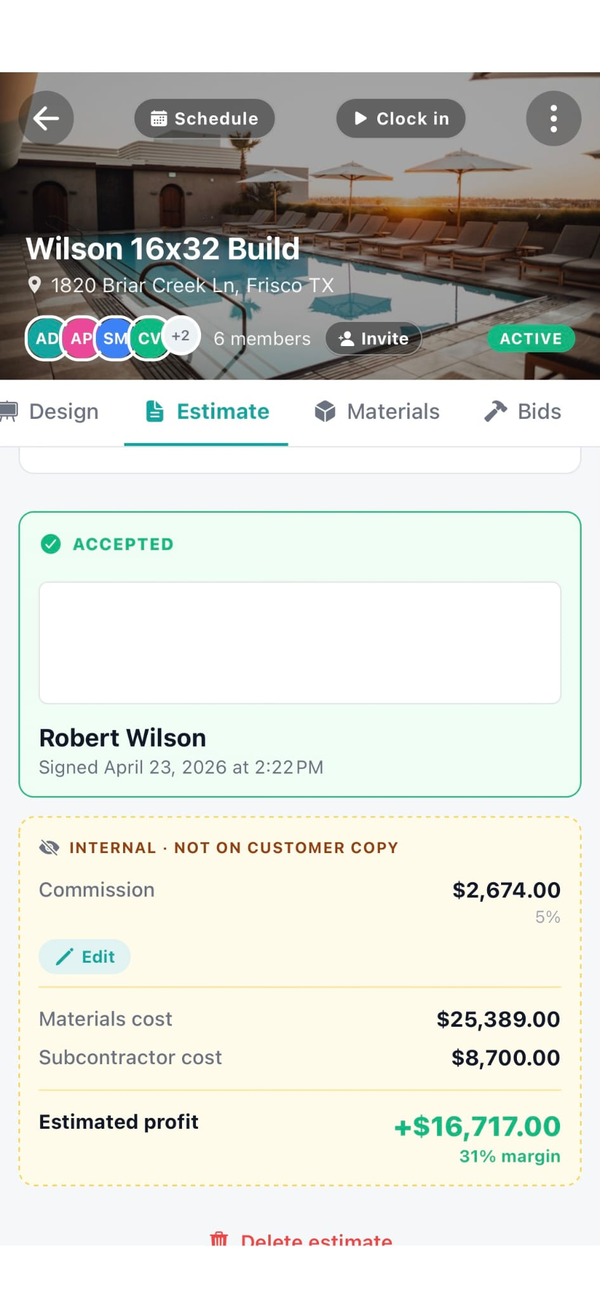
  • Yardage estimation with waste factor. Length, width, depth per slab section. Configurable waste factor. Cost stays internal, sell prints on customer doc.
  • Subcontractor COI tracking for finishing crews. Finishers, decorative subs, pump-truck operators. Expiration alerts.
  • Customer billing profile drives invoice flow. Homeowner deposit-then-balance, GC net-30 progress billing. Automatic.
  • Time tracking with active timer banner. Crew clocks in and out, hours roll up to job costing and payroll.
  • Mileage logs with IRS-rate math. Trips between jobs log automatically. Tax deduction calculated.
  • QuickBooks Online sync on Team plan. Customers, invoices, payments push to QBO automatically.
  • Customer review collection with Google funnel. Auto-email after the cure and walkthrough. 4-and-5 stars routed to Google.
  • Public profile at workhand.app/c/your-name. Indexed by Google. Service area, recent reviews, contact button. Real SEO asset for "concrete contractor near me" searches.

See the full feature list for everything else, the Stripe Connect writeup for deposit setup, and the QuickBooks alternative writeup if you're consolidating bookkeeping.

What we are not

Workhand is not a heavy civil or industrial concrete platform. If your work is highway slip-form, bridge decks, multi-acre commercial slab on metal deck with certified payrolls and Davis-Bacon prevailing wage reporting, you need a proper civil PM tool like B2W or HCSS. Workhand is not built for that level of compliance reporting.

We do not do union prevailing-wage payroll, we do not integrate with concrete batch plants for real-time mix-design transmission, and we do not do GPS fleet tracking on ready-mix trucks. If those are mission-critical, you want the civil-specific platforms.

Workhand is for the residential and light-commercial concrete contractor. Driveways, patios, residential foundations, sidewalks, slabs for additions, decorative concrete, and small commercial flatwork. If that's your shape, we fit. Compare to JobTread or Buildertrend if you're cross-shopping for the project-management angle, or Contractor Foreman for the all-in-one approach.

Pricing for concrete contractors

Three plans. No per-user fees. No per-estimate fees. Most working concrete crews land on Pro or Team depending on crew size and how much commercial foundation work you do.

Free

Solo or one-truck crew
$0 / mo
1 active job, 1 user. Try it on a driveway before paying.

Team

With office staff
$89.99 / mo
Up to 15 team members. Adds job costing, profit per pour, sales pipeline for estimators, QuickBooks Online sync, customer-facing portal, reports. Right once you have a project manager or bookkeeper on the system.

Residential driveway-and-patio crews pick Pro. Concrete contractors with commercial foundation work and a project manager usually need Team for the job costing and QuickBooks sync. See the FAQ for trial and refund details.

Questions concrete contractors ask

Can I collect a deposit before trucks roll?

Yes. Set the deposit as a percentage or dollar amount on the estimate. When the customer signs the estimate, Workhand auto-generates the deposit invoice with a Stripe Pay Online button. Customer pays from their couch. Funds clear to your bank in two business days. You do not mobilize ready-mix trucks or formwork crews until the deposit invoice shows paid in the app. See the Stripe Connect setup writeup.

Does Workhand do multi-stage billing (deposit, pour, finish)?

Yes. The concrete job template runs in phases: site prep, formwork, rebar/wire mesh, pour, finish, cure, cleanup. Each phase can fire a progress invoice automatically. A typical residential driveway runs deposit-then-balance. A larger foundation runs deposit, formwork, pour, finish as four invoice stages. You configure the schedule on the estimate and Workhand triggers the invoices on phase completion.

How does weather-aware pour scheduling work?

Schedule a pour and the schedule view shows the 7-day weather forecast next to the calendar. Rain probability, high and low temperatures (because cold-weather pours need different mix designs), and wind. Reschedule with one tap and everyone on the job thread (crew, finisher sub, ready-mix dispatcher you've messaged) gets the push update. Original date and rescheduled date both stay in the job history.

Can I document pour quality with photos?

Yes. Photos taken on the job auto-stamp date, time, and GPS. Tag them by phase (formwork inspection, rebar tie-out, pre-pour, fresh pour, finish, broom/stamp, cured) for retrieval years later. Slump-test photos, mix-design tickets, and inspector approvals all attach to the job. When the homeowner calls in eighteen months about a hairline crack, the documentation is one tap away.

Can I track my finishing subs and their insurance?

Yes. Finishers, decorative concrete subs, sawing-and-sealing subs, and pump-truck operators come onto the job with their COI on file. Workhand alerts you before the General Liability or Workers' Comp lapses. Their bid attaches to the job so bid-vs-actual cost is visible separately from your own labor. See the subcontractor insurance verification checklist.

How do you handle yardage estimation?

The estimate template includes yardage line items. Log length, width, depth per slab section. Workhand calculates yardage with a configurable waste factor (5% to 10% is typical). The sell line shows yards times your sell price per yard. The internal cost shows yards times your ready-mix supplier cost per yard so margin is visible to you only. Cost stays internal and never prints on the customer doc.

Can I bill residential and commercial concrete differently?

Yes. Customer billing profile sets the default invoice flow. Homeowner driveway and patio work defaults to deposit-then-balance with Stripe Pay Online buttons. Commercial foundation work for a GC defaults to net-30 progress billing with phase-tied pay-applications and a clean PDF the GC's bookkeeper can process. The right invoice template loads automatically.
More reading: Workhand vs JobTread, Workhand vs Buildertrend, Workhand vs Contractor Foreman, the Stripe Connect writeup, and the general contractor page if you also run as a GC on some foundation work.

Try it on your next driveway. Free plan, no card.

Workhand free plan handles your first job at $0 / month. 14-day full trial on Pro and Team. Cancel anytime in the app.

Download on the App Store Get it on Google Play
Read the full FAQ