Built for landscape installation and hardscape
Landscaping software splits cleanly into two camps. One camp is route-and-ticket software built for weekly lawn maintenance (LMN, Jobber, Service Autopilot). Tight dispatch grid, route optimization, 15 to 25 stops per crew per day. The other camp is general contracting software that doesn't really know what a planting plan or a paver patio scope looks like, and treats every job like a four-month kitchen remodel.
Workhand is built for the install-and-hardscape contractor in the middle. Patios, retaining walls, plantings, sod installs, irrigation installs, drainage, lighting, outdoor kitchens. Jobs run as projects with a few crew members on site for one to seven days, not as 30-minute tickets. Customers want to see the paver style you're quoting before they sign. The job's progress matters for the daily-log timeline they scroll through. Recurring invoices handle the post-install maintenance side fine without needing a real dispatch grid. If that shape matches your business, Workhand fits in your truck instead of needing a whole back office.
Workflows we cover
The day-to-day motions of a landscape install or hardscape build, in the order they happen.
Estimates with photos per line item
Pavers, plantings, retaining wall block, sod, mulch, irrigation heads. Add a photo reference to each line so the customer can visualize. Send by email. Customer signs from their phone. Job created automatically.
Photo daily logs through install
Every visit, snap progress photos, drop a note. Customer's portal page shows a timeline they can scroll through. Cuts down on customer calls and gives you a paper trail if there's a dispute later about timing or sequence.
Time tracking per job
Crew clocks in and out on their phone. Active timer banner stays visible until they clock out. Hours roll up against the install for cost reporting and against the payroll period for export.
Mileage logs across all jobs
Trips between jobs log automatically with IRS-rate math. Bookkeeper or accountant runs the report in January and the year's deduction is calculated. No guessing from truck gas receipts.
Change orders mid-install
Customer wants the flagstone walkway extended? Build the CO on your phone, send for e-signature, customer signs from their phone. The CO becomes its own line on the job total. When you invoice, COs show as separate line items.
Invoice from the truck after install
Job complete? Tap Invoice. Workhand pulls line items from the estimate plus any signed COs, emails the customer with a Pay Online button if you have Stripe Connect. From job complete to invoice sent is under a minute.
Recurring invoices for ongoing maintenance
After the install, set up a recurring invoice (monthly, quarterly, annual) for the maintenance plan or irrigation tune-up cycle. Workhand auto-generates and emails the invoice on the right day. Customer pays online.
Sub bidding for tree work, irrigation, lighting
Send the same scope to multiple tree subs or low-voltage lighting subs. Get bids back in-app, pick a winner. The sub gets pulled onto the job with their bid as the starting cost.
What Workhand has that helps landscapers
- Photo-attached line items on estimates. Paver styles, plant references, retaining wall block, sod. Customer sees inline before signing.
- Photo daily logs + customer portal. Progress timeline the homeowner scrolls through. Cuts customer calls. Shareable link, no app install for them.
- Time tracking + mileage with IRS-rate math. Crew clocks in and out on phones. Mileage between jobs logs automatically.
- Change orders with e-signature. Mid-install scope changes get signed and added as their own job line. No more arguing about whether the walkway extension was approved.
- Recurring invoices for post-install maintenance. Monthly, quarterly, annual schedules. Auto-emailed on the right day.
- Subcontractor tracking. Tree subs, irrigation, lighting, masonry. COI alerts before they lapse.
- Customer reviews + Google funnel. Auto-email customers a review request after the install. 4-and-5-star ratings nudged to Google.
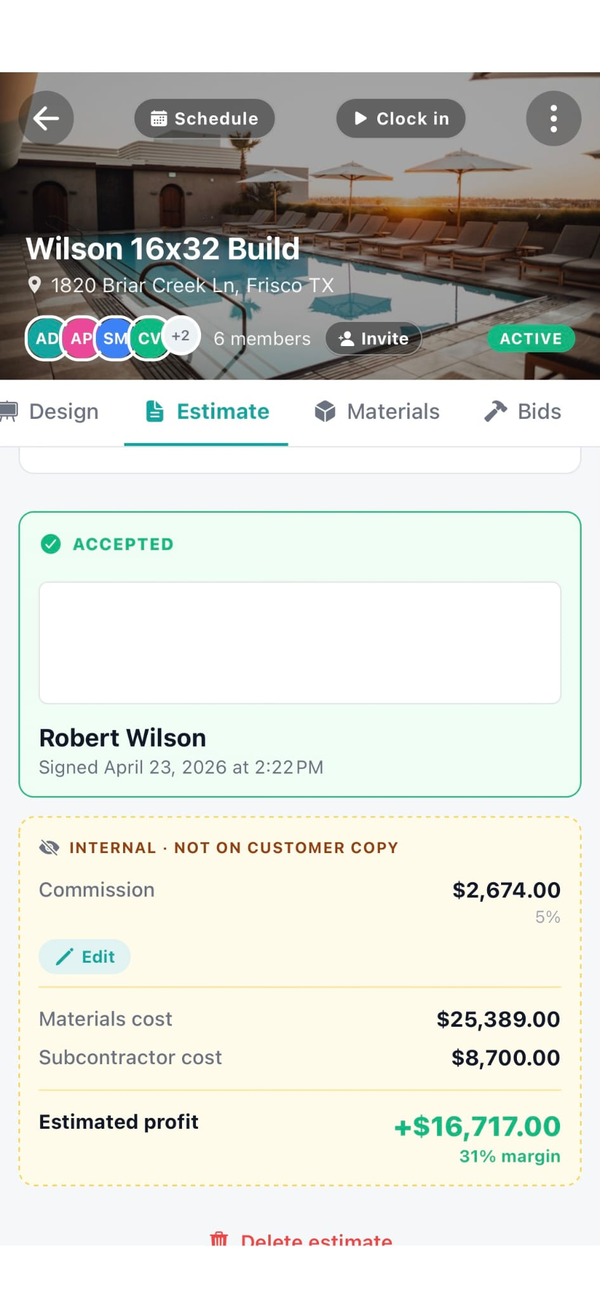
- Job costing + profit per job. Material receipts, sub invoices, crew hours roll into the per-job cost. See real margin per patio or planting install.
- Documents in English, Spanish, or Portuguese. Send estimates and invoices in the language your customer reads. Set per customer. Real difference when your crew leads or customers are Spanish-speaking.
- AI Suggest line items. Type the install in plain English ("400 sq ft paver patio with seat wall and lighting") and AI builds the line items from your catalog. Edit before sending.
- Customizable job tabs per project. Show selections + materials on a hardscape build, hide them on a simple cleanup job. Pick what the field crew sees per job.
See the full feature list for everything else and the FAQ for specifics.
What we are not
Workhand is not weekly-route lawn maintenance software. If your business is 200 residential mow-and-blow accounts where a crew does 15 to 25 stops a day, with route optimization, drive-time minimization, automated start-of-season billing, and chemical application records for pesticide compliance, LMN (Landscape Management Network) or Jobber is the right tool. They're built specifically for that motion. Service Autopilot is another option in the same shape.
We do not do real-time route optimization, automated mow ticket dispatch, or pesticide application compliance reporting. Those are real differences. If those are mission-critical for you, stay with the maintenance-route tools.
Workhand is for landscape contractors doing installation and hardscape work. Project based, multi-day jobs, $3K to $80K projects. Patios, walls, plantings, irrigation, sod, lighting, drainage, outdoor kitchens. Recurring maintenance after install fits fine through recurring invoices. Pure mow-and-blow route businesses should use a route tool.
Pricing for landscapers
Three plans. No per-user fees. No per-estimate fees. Most working landscape contractor crews land on Pro or Team depending on crew size.
Free
Pro
Team
Most working landscape contractor crews choose Pro or Team. Pro covers the working installer-and-hardscape contractor. Team is where you go once you have an office manager or bookkeeper touching the system every day. See the FAQ for trial and refund details.
Questions landscapers ask
Does Workhand do route optimization for weekly lawn maintenance?
No. If you run weekly lawn maintenance routes with 15 to 25 stops a day per crew and need automated route optimization, LMN or Jobber is the right tool. Workhand is built for landscape installation and hardscape projects (patios, retaining walls, plantings, irrigation installs, sod installs) that run as multi-day jobs, not 30-minute mow ticks.
Can I include photos on my landscape estimates?
Yes. Estimates support photo attachments per line item. Add a photo of the paver style you're quoting, the existing conditions you're scoping the work from, a reference plant for the planting line, the area you're installing irrigation in. Customer sees the photos inline in the emailed estimate before they sign.
Can I track time per job for my install crews?
Yes. Each crew member clocks in and out from the job site on their phone. Active timer banner stays visible until they clock out. Hours roll up against each job for cost reporting and against the payroll period for export. Mileage between job sites logs automatically with IRS-rate math.
Can I bill recurring maintenance after the install?
Yes. Set up a recurring invoice schedule (monthly, quarterly, annual) for ongoing maintenance, irrigation tune-ups, seasonal cleanups. Workhand auto-generates and emails the invoice on the right day. Customer pays online through Stripe Connect. You still drop the actual visit on the calendar when it's due. See the Stripe Connect setup.
How are change orders handled mid-install?
Customer adds a flagstone walkway mid-install? Build the change order on your phone, send for e-signature, customer signs from their phone. The CO becomes its own line on the job total. When you invoice, COs show as separate line items so the customer sees exactly what they signed for.
More reading: Workhand vs Jobber, QuickBooks alternative writeup, or the homepage for the full feature surface.