Home › For Plumbers
For Plumbers

Plumber software for service and construction

Workhand is the field-ops app for plumbing shops running both sides of the business. Service calls and water heater swaps that need to be paid before the truck leaves. Repipes, new-construction rough-in, fixture trim-out, and commercial fit-out that run as multi-phase projects with progress billing. One app, one parts catalog with markups, one place for the COD homeowner and the net-30 builder.

Start free, no credit card See pricing
Download on the App Store Get it on Google Play

Free plan to start. 14-day free trial on Pro and Team. No card needed for Free.

Built for the service-and-construction plumber

Plumbing is split-personality work. One half is the dispatch motion: water heater failed at 6am, customer wants a tech that morning, you swap the unit, write the invoice on the tailgate, take payment before you drive away. The other half is project work: a whole-house repipe over four days, new-construction rough-in for a builder doing a row of homes, a commercial tenant fit-out with fixture trim-out and gas connections. The homeowner expects COD with a credit card. The builder expects a net-30 PDF the bookkeeper can process. Both need a parts catalog with cost-vs-sell markups so you actually make money on the copper, the PEX, and the water heaters.

Workhand was built for the shop running both. The service-call job runs as a one-day ticket: diagnose, log parts, invoice with Stripe Pay Online before you leave. The new-construction job runs as a phased project (underground, rough-in, top-out, water heater set, fixture trim, gas connections, final inspection) with progress billing at each milestone the GC's pay-app expects. Customer profile sets the default invoice flow so the right thing happens automatically. After-hours rates kick in when you flag a job as emergency. Recurring billing handles backflow testing plans. One app for the whole business.

Workflows we cover

The day-to-day motions of a service-and-construction plumbing shop, from a 2am water heater leak to a four-day repipe.

Service-call dispatch with instant invoice

One-day jobs for service calls. Diagnosis logged, parts pulled from the catalog, labor at your rate sheet, Invoice button hit before you put tools away. Customer taps Pay Online, you walk to the truck paid in full. Stripe Connect funds to your bank in two business days.

Pre-built parts catalog with cost-vs-sell markups

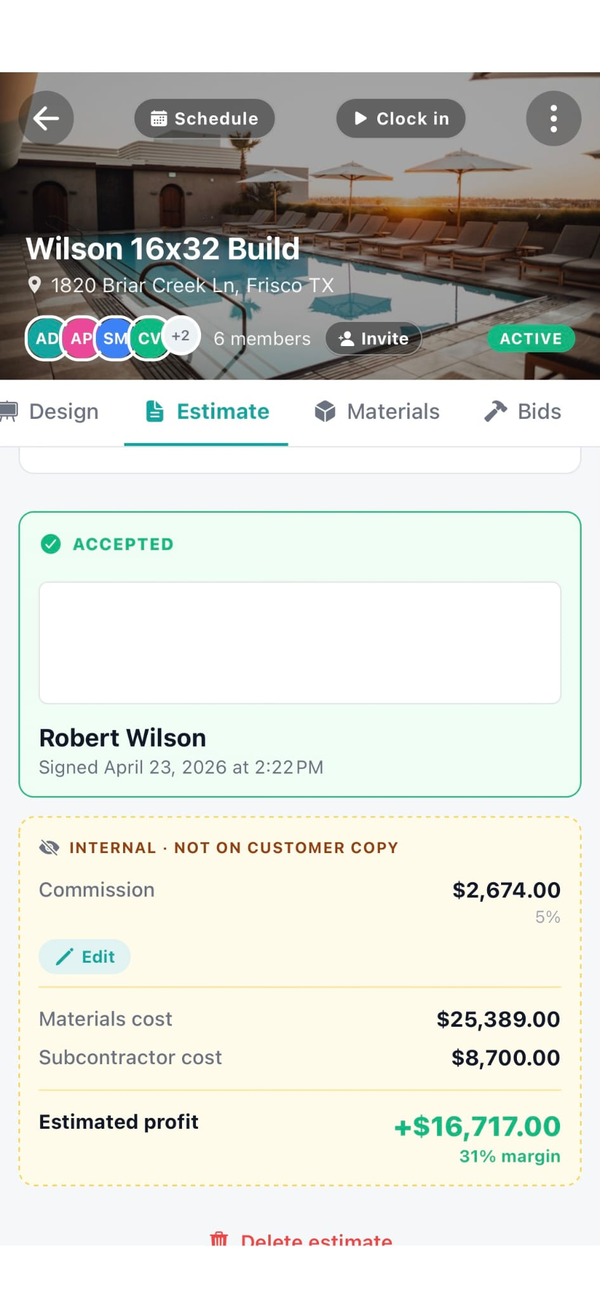
Water heaters by gallon capacity, PEX by size, copper, fittings, valves, fixtures, P-traps, brass nipples, dielectric unions. Cost and sell stored separately. Customer sees the marked-up sell only. Job costing reports show your true margin.

Repipe and water heater estimates

Build the estimate from your catalog with fixtures-and-counts, water heater make and model, expansion tank, recirc pump, gas line work, drywall patch allowance. Send by email, customer signs from the couch. Permit fees as pass-through line items on the customer doc.

Rough-in versus finish plumbing on new construction

New-build jobs ship with a phase template: underground, rough-in, top-out, water heater set, fixture trim, gas connections, final inspection. Each phase has its own checklist and progress-billing trigger. The GC pulls the right invoice for the right phase at the right time.

After-hours emergency billing

Flag a job as after-hours and your service catalog auto-defaults to premium rates (emergency dispatch fee, time-and-a-half labor, weekend differential). Customer gets an itemized invoice that justifies the bill, paid online before they have buyer's remorse on the 2am water heater swap.

COD vs net-30 billing logic per customer

Homeowner customers default to COD with Stripe Pay Online buttons on the invoice. Builder and remodeler customers default to net-30 with a clean PDF the bookkeeper can process. Workhand uses the right template automatically based on the customer profile.

Recurring service plans

Annual backflow testing, quarterly drain maintenance for commercial accounts, monthly recirculation system service. Set the recurring invoice schedule once and Workhand auto-generates and emails the invoice on the right day. Customer pays online through Stripe Connect.

Photos and measurements per visit

Before-and-after photos auto-stamp with date, time, and GPS. Measurements logged on the daily-log entry. The plumbing inspection trail and the homeowner's "remember when the floor under the sink was rotten" reminder both live in the same place.

What Workhand has that helps plumbers

  • Pre-built parts catalog with markups. Cost and sell stored separately. Cost stays internal. Edit per SKU as supply prices move.
  • Stripe Connect for instant invoice payment. Customer taps Pay Online, funds to your bank in two business days. Cuts the chase on $400 service calls.
  • Customer profile drives invoice template. COD homeowners, net-30 builders. The right template loads automatically.
  • Phased new-construction job template. Underground through final inspection, each phase with its own progress-billing trigger.
  • After-hours service catalog with premium rates. Flag the job, the catalog defaults to emergency pricing.
  • Recurring invoices for service plans. Backflow testing, drain maintenance, recirc service. Auto-bills on the right day.
  • GPS and timestamp on every photo. Inspection trail and warranty documentation in one place.
  • Subcontractor insurance tracking. Sub the gas hookup or the drywall patch with COI tracking and bid-vs-actuals separate from your labor.
  • Time tracking with active timer banner. Crew clocks in and out from the job, hours roll up to job costing and payroll.
  • Mileage logs with IRS-rate math. Trips between jobs log automatically, tax deduction calculated.
  • QuickBooks Online sync on Team plan. Customers, invoices, payments push to QBO automatically.
  • Public profile at workhand.app/c/your-name. Show licensing, COI status, recent reviews. Free SEO leverage for "plumber near me" searches.

See the full feature list for everything else and the QuickBooks alternative writeup for the bookkeeping decision.

What we are not

Workhand is not a dispatch-first plumbing service platform. If your shop runs 10 to 18 service calls per tech per day off a drag-and-drop dispatch grid with route optimization, agreement renewal automation tied to membership tiers, and a price book the techs upsell from at the kitchen table, you want ServiceTitan or Housecall Pro. They are built specifically for that motion. Service Fusion is the lower-cost option in the same shape.

We do not do route optimization, we do not do a real dispatch grid, we do not do agreement-renewal pipelines with auto-billing tied to membership tiers, and we do not do supplier-integrated price-book management. Those are real differences. If those are mission-critical for you, stay with the dispatch-first tools.

Workhand is for the plumbing shop where the work is a mix of service calls and construction projects. If pure-service dispatch is 80% of your revenue, we are the wrong tool. If repipes, new-construction rough-in, water heater installs, commercial fit-out, and bathroom-remodel rough work make up real money for you alongside day-to-day service, we fit.

Pricing for plumbers

Three plans. No per-user fees. No per-estimate fees. Most working plumbing shops end up on Pro or Team depending on crew size and whether there's an office.

Free

Solo plumber
$0 / mo
1 active job, 1 user. Try it on one service call or one repipe before paying.

Team

With office staff
$89.99 / mo
Up to 15 team members. Adds job costing, profit per repipe or water heater swap, QuickBooks Online sync, customer-facing portal, sales pipeline, reports. Right once a bookkeeper or office manager is in the system daily.

Most working plumbing shops pick Pro. Once you have a second journeyman and an office person processing builder pay-apps and customer payments, you'll outgrow Pro into Team for the job costing and QuickBooks sync. See the FAQ for trial and refund details.

Questions plumbers ask

Does Workhand have a parts catalog with markups?

Yes. Build the parts catalog with cost and sell price per SKU (water heaters by gallon capacity, PEX by size, fittings, valves, fixtures, P-traps, copper). Workhand stores cost and markup separately. The customer estimate shows the marked-up price only. Job costing reports show the cost so margin per job is visible to you. Cost stays internal and never prints on the customer invoice.

Can I get paid before I leave the job site?

Yes. Finish the service call, tap Invoice, the line items pull from your parts catalog and labor rate. Customer gets the invoice email with a Pay Online button. Most homeowners pay with a tap. Stripe Connect funds to your bank in two business days. See the Stripe Connect setup.

How do I separate service work from new-construction billing?

Each customer has a billing profile. Homeowners default to COD with Stripe payment buttons on the invoice. Builders and remodelers default to net-30 with a PDF the GC's bookkeeper processes. New construction jobs run as multi-phase projects (rough-in, top-out, finish) with progress billing at each milestone. Service calls run as one-day jobs.

Can I track rough-in versus finish plumbing on a new build?

Yes. New construction jobs ship with a phase template: underground, rough-in, top-out, water heater set, fixture trim, gas connections, final inspection. Each phase has its own checklist, milestone, and progress invoice trigger. Pull the GC's pay-app schedule from the estimate and Workhand auto-flags which phase you should be billing for this month.

Does Workhand handle after-hours emergency invoicing?

Yes. Your service catalog has separate line items for after-hours rates (premium hourly, emergency dispatch fee, weekend differential). When you mark a job as after-hours, the catalog defaults to the premium rates. Customer gets an itemized invoice that justifies the bill and a Stripe Pay Online button so the 2am water-heater leak gets paid before buyer's remorse.

Can I run recurring service plans for backflow testing or drain maintenance?

Yes for the billing side. Set a recurring invoice schedule (monthly, quarterly, annual) and Workhand auto-generates the invoice on the right day with the Stripe Pay Online button. Customer pays automatically. You schedule the actual visit manually onto the calendar when it's due. Auto-scheduling is on the roadmap.

Is Workhand a dispatch-first plumbing platform like ServiceTitan?

No. If your shop runs 10 to 18 service calls per tech per day off a dispatch grid with route optimization, agreement renewal pipelines, and price-book selling at the kitchen table, ServiceTitan or Housecall Pro is the right tool. Workhand is for plumbing shops doing a mix of service and construction. The job runs as a project or a one-day ticket as appropriate.
More reading: Workhand vs ServiceTitan, Workhand vs Housecall Pro, Workhand vs Jobber, the sending invoices from your phone writeup, and the HVAC contractor page if you also do mechanical work.

Try it on your next service call. Free plan, no card.

Workhand free plan handles your first job at $0 / month. 14-day full trial on Pro and Team. Cancel anytime in the app.

Download on the App Store Get it on Google Play
Read the full FAQ