Feature · Risk & Compliance

Subcontractor Insurance (COI) Tracking with Auto-Alerts

Push and email alerts at 30, 14, and 7 days before every sub's COI expires. Per-sub document storage. An optional gate that blocks sub assignment when insurance is lapsed. Built for small construction crews where one missed certificate can spike your GL premium by 28 percent at renewal.

Get Workhand free See pricing
Quick answer: Workhand stores every subcontractor's GL, Workers Comp, and Auto certificates per sub, tracks the expiration date, and fires push and email alerts at 30, 14, and 7 days out. An optional setting blocks a sub from being assigned to a new job if their COI is expired. Renewal-ready PDF export for your insurance auditor. Included on every plan including Free. Works on iOS and Android.

The problem this solves

Here is the story that sells COI tracking to every GC who has ever lived it. You run subs for six months. Concrete, plumbing, electrical, screen enclosure, the whole pool build chain. One of those subs, say the screen sub, has a GL policy that quietly lapsed in month three. Nobody noticed. He kept showing up. You kept paying invoices.

Then your own GL renews. Your insurer sends an auditor. The auditor reads through your 1099s, asks for COIs on every sub paid in the policy year, and finds the screen sub has no valid certificate on file for the period he was working. Per the policy, the auditor reclassifies that labor as direct payroll. Your GL premium for the next year jumps 28 percent. On a small contractor doing 200,000 a year in subcontracted labor, that is a real four-figure bill you did not budget for.

The duct-tape fix is a spreadsheet, or a folder of emailed PDFs, or a calendar reminder set once a year. None of it scales. The first sub you forget to chase is the one the auditor finds.

How Workhand handles it

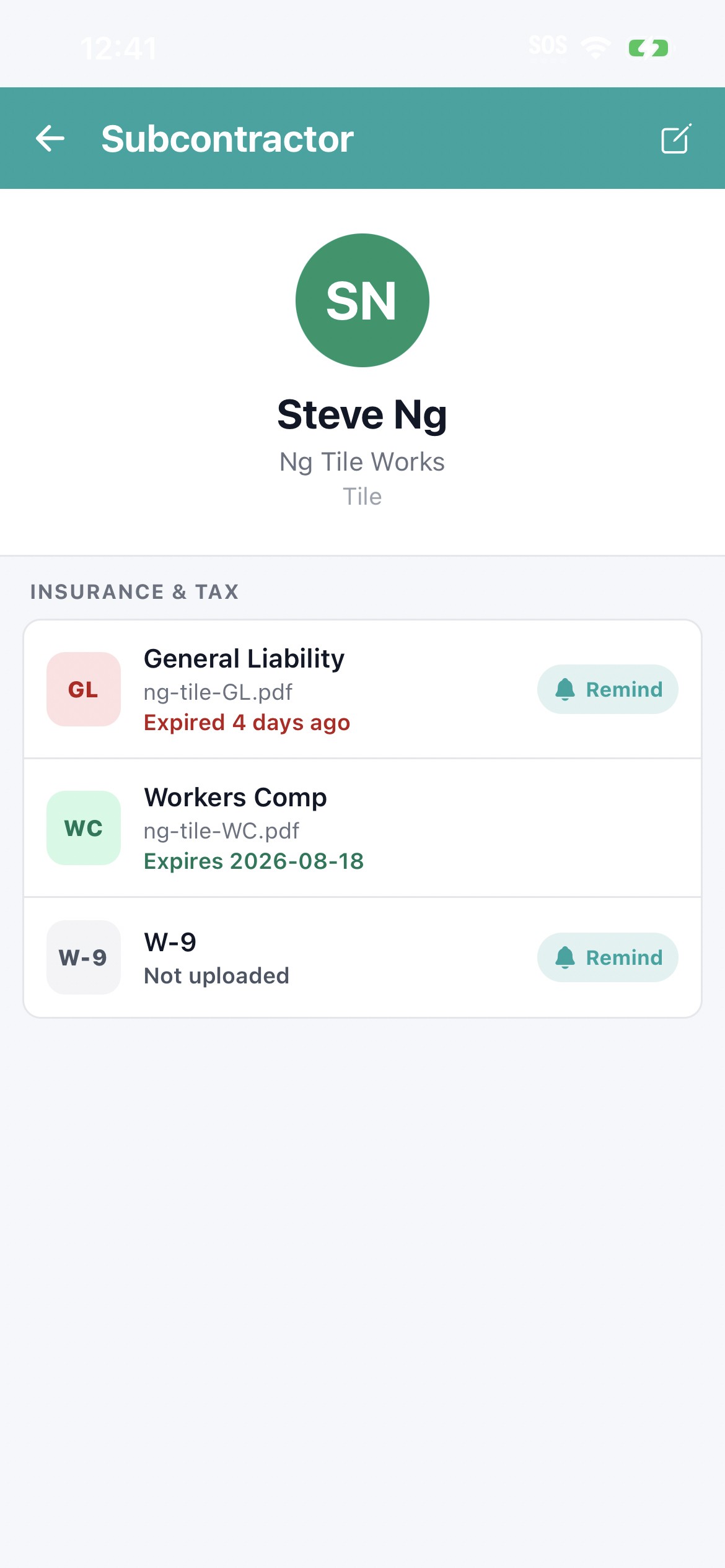
Every subcontractor on your roster gets a profile with attached COI documents. You upload the GL certificate, the Workers Comp certificate, and the Auto certificate (the three policies your insurer cares about) and you enter the expiration date for each. From that point Workhand watches the dates.

At 30 days before expiration, Workhand sends a push notification and an email. Same at 14 days. Same at 7 days. The alert names the specific sub, the specific policy, and the specific expiration date. The renewal chase becomes a tap, not a hunt through a filing cabinet.

If you flip the optional gate on, an expired COI also prevents that sub from being assigned to a new job. Office staff trying to add the sub to a job sees a clear block with the reason. That is the safety net that catches the times when alerts get missed in the inbox flood.

What you getHow it works
30/14/7 day alertsPush and email notifications fire automatically at three windows before any COI expires.
Per-sub document storageGL, Workers Comp, and Auto certificates stored on the sub's profile with expiration dates.
Active vs expired statusSub roster shows status pills so you see at a glance who is current and who is overdue.
Renewal-ready exportOne-tap PDF that lists every sub, policy, issuer, and expiration. Built for the GL auditor.
Optional assignment gateSetting toggle that blocks sub assignment when COI is expired. Off by default. On when you are ready.
Office staff routingPro and Team plans route alerts to office users so the chase is not on one person.
iOS and Android syncSame data on the owner's phone, the office computer, and the foreman in the truck.

Why this matters more than most field-service features

Most construction software treats COI tracking as a checkbox feature buried three menus deep. Workhand puts it on the home screen because the financial impact of a missed COI is bigger than the typical small contractor realizes. Three specific reasons:

  1. Your GL premium is the real number. Reclassified labor at renewal is a multi-thousand-dollar hit on a small business. Tracking COIs is premium protection, not paperwork.
  2. Workers Comp lapses are the silent killer. A sub's WC can cancel mid-term without anyone calling you. If that sub then gets hurt on your job, the claim flows to your policy. The 30-day alert window catches lapses that nobody else flags.
  3. Documentation wins disputes. When a customer or an insurance carrier asks who was on a specific job on a specific date with what coverage, the export gives you the receipt. Without it you are reconstructing six months later from memory.
  4. The bigger your sub roster, the bigger the upside. One sub is a calendar reminder. Twenty subs is a system. Workhand scales from one to two hundred without changing the workflow.

Who this is built for

Try Workhand free

Free plan includes COI tracking with 30/14/7 day alerts on 1 active job. Upgrade to Pro at 34.99 per month for unlimited jobs, or Team at 89.99 per month for up to 15 users. 14-day free trial on paid plans.

Get the app See pricing

Common questions

What is COI tracking in a construction app?

COI tracking is the process of storing each subcontractor's Certificate of Insurance, monitoring the expiration date, and alerting the GC before the policy lapses. Workhand stores GL, Workers Comp, and Auto certificates per sub, then sends push and email alerts at 30, 14, and 7 days before expiration. An optional setting blocks a sub from being assigned to a job once their COI is expired.

When do COI expiration alerts fire?

Workhand fires alerts at 30 days, 14 days, and 7 days before any subcontractor COI expiration date. Alerts arrive as push notifications on iOS and Android, and as email to the owner and office staff. The alert names the specific sub, the specific policy (GL, WC, or Auto), and the exact expiration date so the next step is obvious.

What does it cost a GC when a subcontractor COI lapses?

If your GL insurer audits the policy at renewal and finds a sub working on your jobs without a valid COI on file, the auditor will reclassify that sub's labor cost as direct payroll. We have seen GL premium jumps of 28 percent on a single missed COI in pool construction. The same risk exists across remodeling, roofing, and general contracting. Tracking COIs is not paperwork, it is premium protection.

Can Workhand block me from using a sub with expired insurance?

Yes. There is an optional setting toggle that prevents a subcontractor from being assigned to a new job if their COI is expired. The toggle is off by default so you can roll out tracking before enforcement, then flip it on once your roster is clean. The block also surfaces a clear reason so the office knows exactly which policy needs to be refreshed.

Does COI tracking cost extra on Workhand?

No. COI tracking is included on every plan, including the Free plan. There is no per-sub cost, no per-document cost, and no separate add-on. Pro at 34.99 per month and Team at 89.99 per month unlock unlimited jobs and more users, but the COI tracking surface itself is universal.

What does the auditor-friendly export include?

The export is a PDF that lists every sub on your roster, the policies on file for each, the issuer, the effective date, the expiration date, and a thumbnail of the certificate itself. The format is built to match what a GL auditor asks for at renewal. Email it to your insurance broker or hand it to the auditor without rebuilding a spreadsheet from scratch.

Can my bookkeeper or office manager get the COI alerts too?

Yes. On Pro and Team plans you can invite office staff with email alert routing. The owner gets push and email by default. Office users get email alerts so the renewal chase does not fall on one person. Team plan supports up to 15 users so a full office can stay in the loop.

Does Workhand verify the COI is real or current?

Workhand stores the document the sub provides and tracks the expiration date you enter. It does not phone the insurer to verify the policy is still in force mid-term. For sensitive jobs we recommend you still call the issuing agent before mobilization, especially on Workers Comp where cancellations can happen between renewals. The point of Workhand is to never forget to ask, not to replace the agent call.