Home › For General Contractors
For General Contractors

Construction software for general contractors

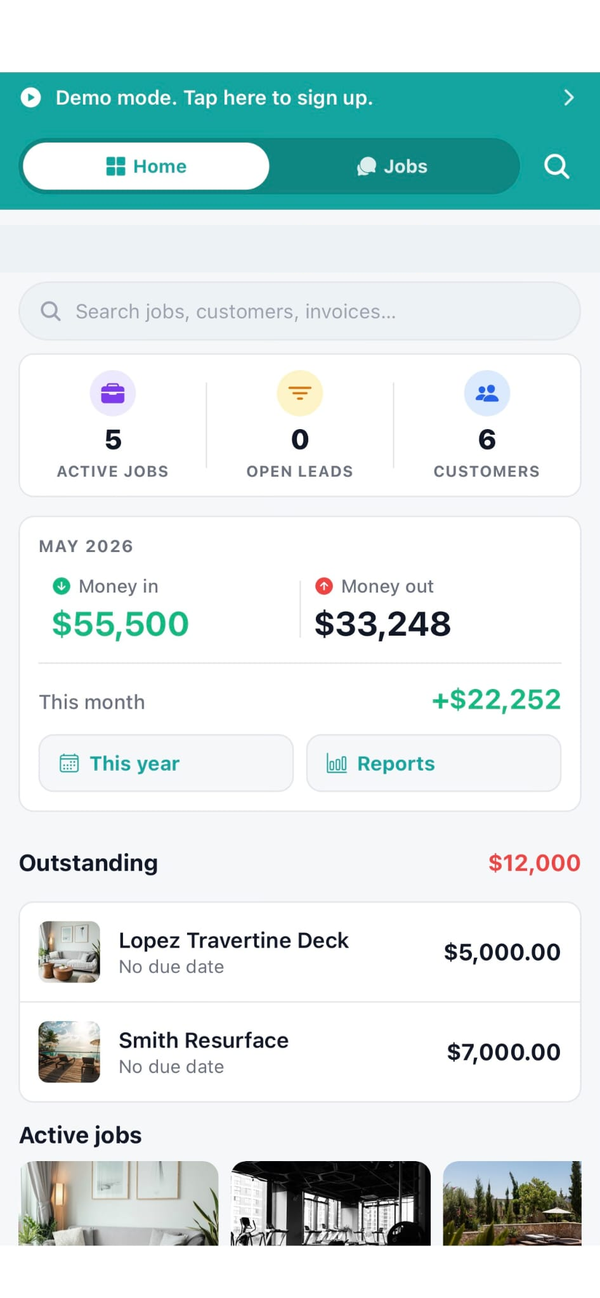
Workhand is the field-ops and project management app for residential general contractors running $200K to $3M jobs. Subcontractor management, COI tracking, change orders, photo daily logs, crew chat per job, and invoicing from the truck. Built for the GC who runs the job, not just the office.

Start free, no credit card See pricing
Download on the App Store Get it on Google Play

Free plan to start. 14-day free trial on Pro and Team. No card needed for Free.

Built for general contractors

General contracting on the residential side is its own animal. The job isn't framed by an owner's rep with a Procore login and a bank funding draws on a G702. It's framed by you, a homeowner who texts at 9pm, three subs who all want to bid before next Tuesday, and a change order the painter wrote on a piece of trim board. Most software either treats you like an enterprise commercial GC (Procore, Autodesk) or like a one-truck handyman (Jobber). Neither fits the working residential GC doing six to fifteen jobs in flight.

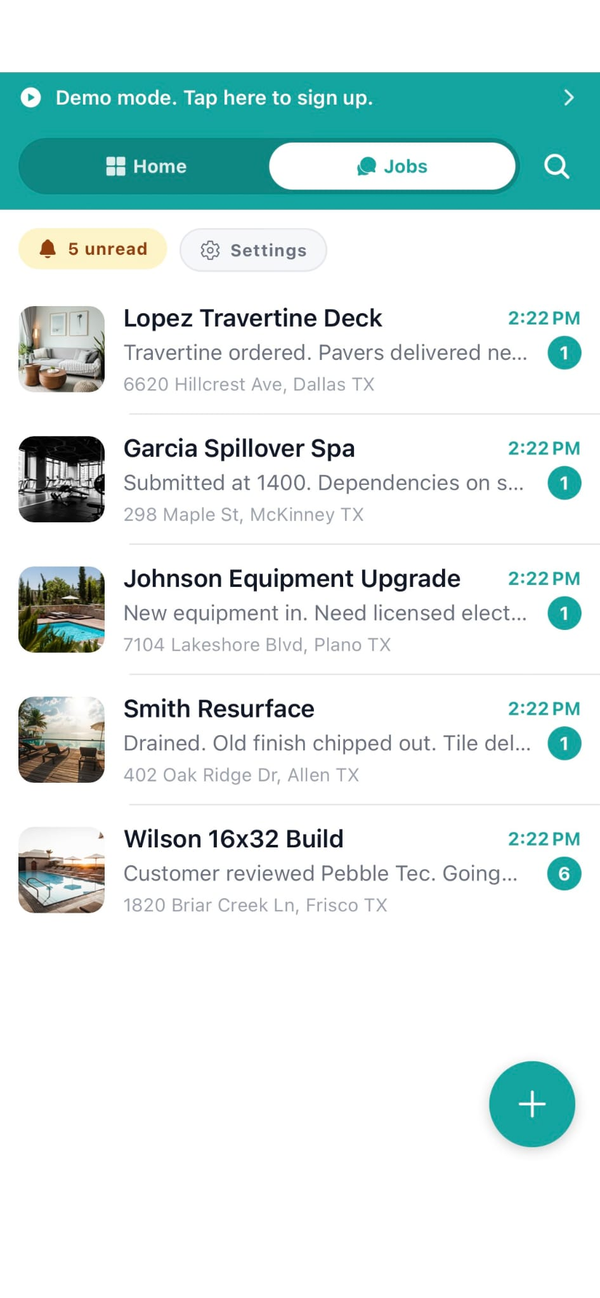
Workhand is what fits in the middle. It runs on your phone because that's where you actually work. It tracks subs, their insurance, their bids, and what you've paid them. It runs change orders as signed line items, not text messages. It logs daily progress with photos for the lookback your customers always ask for. And the whole crew, including every sub, is on the same job thread in the app instead of seven separate group texts.

Workflows we cover

The day-to-day of a residential GC has a few specific motions Workhand is tight around. Here's what we do well, in the order they tend to come up on a real job.

Sub bid management

Send the same scope to three plumbers from the bid manager, see all three quotes side by side, pick a winner, and that sub gets pulled onto the job with their bid as the starting cost. No more rebuilding the cost from a text screenshot.

Subcontractor insurance + COI tracking

Every sub uploads their General Liability cert, Workers' Comp, and W-9 to their free sub account. Workhand stores the expiration dates and warns you before they lapse. When your insurance carrier audits, the documents are in one place with a date stamp.

Change orders as signed line items

Customer wants the half bath added mid-framing. Build the CO on your phone, send it for e-signature, customer signs from their couch. The CO becomes its own line on the job total. No more arguing in February about whether the granite upgrade was approved.

Milestone draws + progress invoicing

Set up a draw schedule on the job (deposit, framing, drywall, trim, final). Mark each milestone complete on your phone when it actually is, and Workhand generates the invoice. Customer pays online through Stripe Connect, money lands in two business days.

Photo daily logs

Every visit, snap a photo, drop a note. The job's portal page builds a timeline the customer can scroll through any time. Cuts down on the "what's happening this week" phone calls and gives you a paper trail when a sub disputes their pay app.

Per-job crew chat with role scoping

One thread per job. You see everything. PMs see their assigned jobs. The framer sees framing-scope messages. The plumber sees plumbing. No more group text where the electrician is reading about countertop selections he doesn't care about.

Job costing + real margin per job

Material receipts, sub invoices, and crew hours roll into a per-job cost number, and Workhand pulls the margin against your contract value live. You see in May whether the March kitchen actually made money, not in February of next year.

1099 ledger for tax time

Every payment to a sub gets tagged. In January, run the 1099 report and you get one row per sub with the total paid and their W-9 info. Hand it to your accountant or import it. No reconstructing payments from check stubs.

What Workhand has that helps GCs

  • Subcontractor invitations + role scoping. Invite subs to specific jobs only. They see their scope, never your other customers, your costs, or your margin.
  • Bid manager with side-by-side comparison. Send the same scope to multiple subs, get quotes back in-app, pick the winner with one tap.
  • COI + W-9 expiration alerts. Workhand emails you 30 days before any sub's insurance lapses. No more scrambling the morning of an audit.
  • Change orders with e-signature. Build, send, sign, attached to the job total automatically. Audit trail is built in.
  • Materials catalog + receipts. Save your typical material costs as templates. Snap photos of receipts on the way out of the supply house, they attach to the job.
  • Customer-facing job portal. One link sent to the homeowner. They see hero photo, daily progress photos, signed CO list, balance due. No login, no app install for them.
  • QuickBooks Online sync. Customers, invoices, and payments push to QBO. Your bookkeeper opens QuickBooks Monday morning and the week is already there.
  • Sales pipeline with notes per lead. Track every inquiry from new through won or lost. See your real win rate, not what you think it is.
  • AI Suggest line items on estimates. Type the scope in plain English ("full kitchen remodel, gut to studs, custom cabinets") and AI builds the line items from your catalog and past estimate templates. Edit anything before sending.
  • Documents in English, Spanish, or Portuguese. Send estimates and invoices in the customer's language — set per customer, no extra setup. Useful when you have Spanish-speaking subs or homeowners.
  • Customizable job tabs. A remodel job might show Selections, Materials, and Punch List. A foundation pour might show only Daily Log and Time. Pick which tabs appear on each job so the field crew sees only what matters.

See the full feature list for everything else, and the FAQ for specifics on how the role permissions work.

What we are not

Workhand is not enterprise commercial construction software. If you are running a commercial GC doing $5M and up projects with bank-funded draws, owner reps, RFIs, AIA G702 and G703 billing, and a daily report culture, Procore is built for you and you should use it. Workhand will feel underweight.

We are also not Buildertrend or CoConstruct. Those tools do formal AIA draw schedules with the bank, subcontractor portals with bidding workflows layered three deep, and selection libraries with hundreds of catalog imports. They cost $399 to $599 a month plus implementation and they're built for the GC who has an office manager living in the system full time.

Workhand is for the residential GC doing $200K to $3M jobs where the owner is also the PM and the whole crew lives on phones. The system has to fit in the truck, not at a desk someone has to drive to.

Pricing for general contractors

Three plans. No per-user fees. No per-estimate fees. Most working GCs we talk to land on Pro or Team depending on crew size.

Free

Solo GC, one job at a time
$0 / mo
1 active job, 1 user. Good for trying it on a real project before paying.

Team

Crew + office staff
$89.99 / mo
Up to 15 team members. Adds job costing, profit per job, sales commissions, QuickBooks Online sync, sales pipeline, customer-facing portal, reports. The right plan once you have an office manager or bookkeeper in the system daily.

Most working GCs choose Pro or Team. The Free plan is honestly best as a trial of a real job before you upgrade. If you have an office manager touching the system every day, go Team for the QBO sync and the cost reporting. See the FAQ for the 14-day trial and refund terms.

Questions GCs ask

Is Workhand a replacement for Procore?

No. Procore is enterprise commercial construction software for projects in the $5M and up range with bank-funded draws, AIA billing, and an office full of PMs. Workhand is for the residential general contractor running $200K to $3M jobs, where the owner is also the PM and the whole crew lives on phones. Different shape of business, different tool. See how we compare to Buildertrend for the closer midmarket option.

How does Workhand handle subcontractor insurance tracking?

When you invite a sub to a job, they create a free sub account and upload their General Liability certificate, Workers' Comp, and W-9. Workhand stores expiration dates and warns you before any cert lapses. You see a sub's insurance status at a glance before assigning them to a new job. More detail in the FAQ.

Can I track change orders separately from the original contract?

Yes. Each change order lives as its own line on the job with its own e-signature and total. The original contract stays intact and you can see exactly how the job's total has grown over time. When you invoice, change orders show as separate line items.

Does Workhand do draw schedules?

Workhand supports milestone-based invoicing, which is how most residential GC draws actually work in practice (deposit, drywall, trim, final). You set the milestones, mark each one complete, and Workhand generates the invoice. We do not produce AIA G702 / G703 formatted documents for bank-funded commercial draws. If you need those, Buildertrend or CoConstruct is a better fit.

Can my project managers use Workhand without seeing costs?

Yes. Roles are granular. Owner and Office roles see cost prices, profit margins, and commissions. Project managers can be set to either see costs or not see costs. Employees and subcontractors never see internal cost or margin data, even on the same estimate they help build.

More reading: the QuickBooks alternative writeup for small contractors, the three-way comparison with JobNimbus and Buildertrend, or just the homepage if you want the full feature surface.

Try it on your next job. Free plan, no card.

Workhand free plan handles your first job at $0 / month. 14-day full trial on Pro and Team when you outgrow it. Cancel anytime in the app.

Download on the App Store Get it on Google Play
Read the full FAQ