The problem this solves
A contractor doing $200,000 a year in residential work puts roughly 12,000 to 18,000 business miles on their truck. At the 2025 IRS standard rate of 0.67 per mile, that is $8,000 to $12,000 in deductible expense. Most contractors track maybe 30 percent of it because logging trips at the end of each day is the easiest task to skip.
The standard pattern is reconstruction. April rolls around, the accountant asks for mileage, the contractor opens Google Maps history and tries to remember which trips were business and which were Saturday afternoon family errands. The number that ends up on Schedule C is a guess that the accountant accepts because the alternative is missing the deduction entirely. If the IRS audits, that guess does not hold up.
The auto-detect mileage apps tried to solve this with GPS background tracking. They generate logs that mix business and personal driving, the user is supposed to classify each trip afterward, and most do not. The IRS knows this. Auto-detected logs are exactly the evidence a mileage auditor reclassifies as personal because the contemporaneous business-purpose annotation is missing.
How Workhand handles it
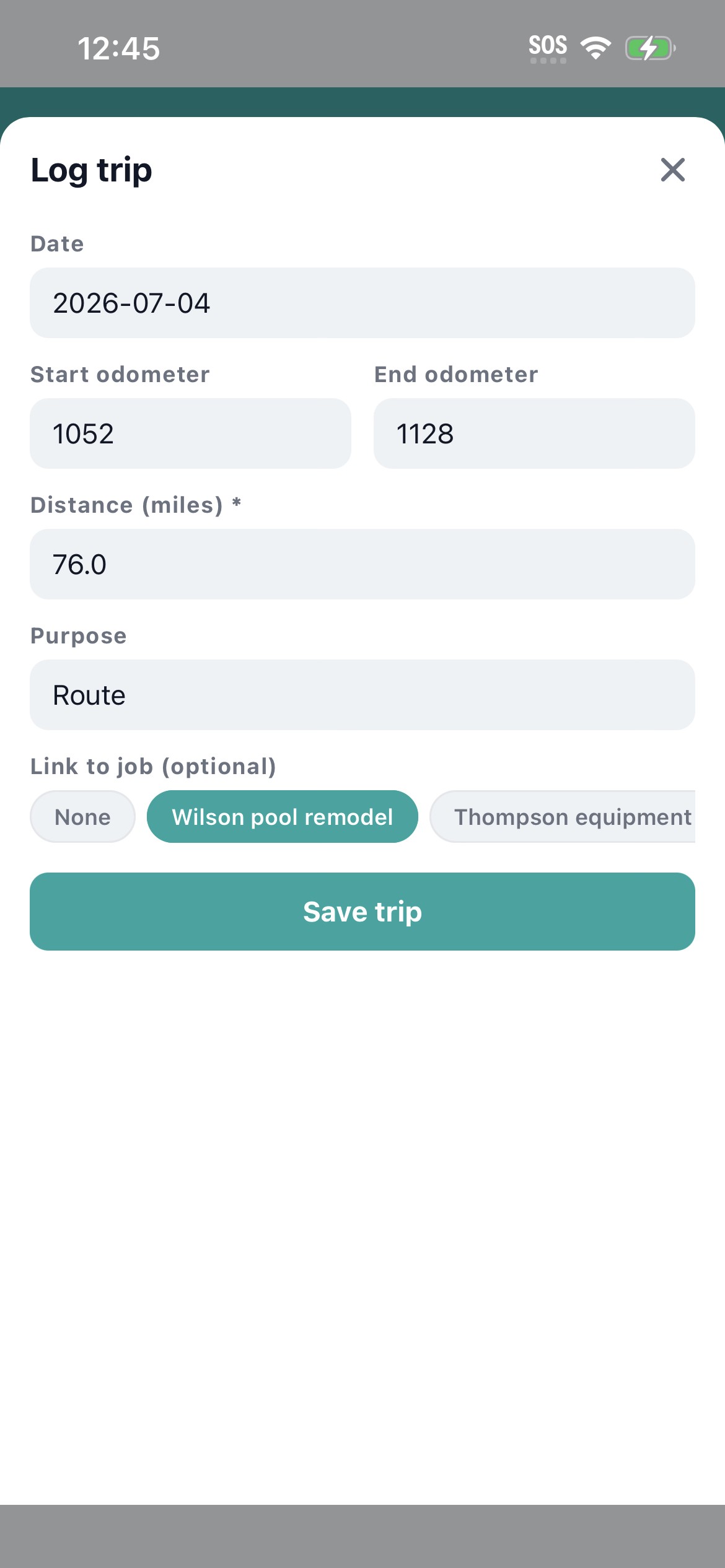
Manual entry, fast. In the Mileage section, tap the plus button. Enter the start address (or start odometer reading), the end address (or end odometer), the distance, an optional job link, and an optional purpose note ("Ferguson supply run", "Smith pool inspection", "dump trailer haul"). Tap Save. The trip is logged.
Workhand applies the current IRS standard rate (0.67 per mile for 2025) automatically. The mileage summary view shows total miles for the period, total deduction value, breakdown per driver, breakdown per job. You see the tax-deductible expense in real time, not in April.
Employees log their own mileage and only see their own trips. Owners and admins see the company-wide ledger. This means each helper or driver is responsible for their own trip log, which is the only way to get accurate data at scale.
When tax time comes, CSV export from the mileage screen with a date range filter. Date, driver, start address, end address, distance, deductible value, job link, purpose. Total miles and total deduction sum at the bottom. Email it to your accountant or hand it to an IRS auditor. The contemporaneous nature of the log (entered at the time of the trip, not reconstructed) is what makes it audit-defensible.
| What you get | How it works |
|---|---|
| 20-second trip entry | Start, end, distance (or odometer), optional job, optional purpose. Tap Save. |
| Current IRS mileage rate | Workhand applies the IRS standard rate (0.67/mile for 2025) automatically. Updates with rate changes. |
| Per-job link | Tie a trip to a specific job and the deduction rolls into job costing alongside materials and labor. |
| Per-driver scoping | Employees log their own trips, owners see the company-wide ledger. Each driver owns their data. |
| Offline support | Trip entry queues locally without signal and syncs the second connection returns. |
| Distance or odometer | Both supported. Distance is faster, odometer is more audit-defensible. Pick the style your accountant likes. |
| Mileage summary | Total miles, total deduction value, broken out per driver and per job for any date range. |
| CSV export | Accountant-ready format with date, driver, addresses, distance, deduction, job, purpose. Totals at the bottom. |
Why manual beats auto-detect for IRS purposes
The IRS standard for a deductible mileage log requires the date, mileage, business purpose, and destination of each trip, recorded contemporaneously (at the time of the trip or shortly after). Three reasons manual entry produces a better record than GPS auto-detect:
- Business purpose is the missing piece in auto-detected logs. A GPS app records that you drove from 123 Main to 456 Elm. It does not know whether that was a Smith pool inspection or your kid's soccer game. Without the contemporaneous business-purpose annotation, the IRS treats the trip as personal until proven otherwise. Manual entry forces the purpose to be captured in the moment.
- Mixed-use vehicles are common for contractors. The same truck that hauls plumbing supplies during the week takes the family to the lake on Sunday. An auto-detect tool logs both kinds of trips and asks the user to classify later. Most do not. The log ends up with personal miles claimed as business, which is the worst-case audit finding.
- Audit-defensibility favors discipline over convenience. A short, clean log with contemporaneous notes beats a long auto-generated log with no annotations. Tax court rulings consistently treat retroactive reconstructions as weak evidence. Workhand's 20-second manual entry sits in the middle of these two: fast enough to actually do, structured enough to hold up.
Job-tied mileage versus general mileage
Two different reasons to log mileage. Both supported.
Job-tied mileage links a trip to a specific job (Ferguson supply run for the Smith pool, dump trailer haul from the Garcia kitchen). The deductible value rolls into the job costing view alongside materials, labor, and other costs. This is the right way to do mileage on cost-plus jobs and on any build where you charge mileage back to the customer.
General mileage (supply run for general inventory, office errand, business meeting) gets logged without a job link. The trip still counts as a tax deduction at the IRS rate, it just does not allocate to a specific job's profit calculation.
Who this is built for
- Pool builders driving between concrete pours, supply yards, inspections, and active builds
- HVAC service techs running four to six service calls per day plus parts pickups
- Remodelers with multiple builds open simultaneously requiring frequent supply runs
- Plumbers with rotating service calls and emergency dispatches
- Solar installers driving to rural sites where the truck rolls 80+ miles per install
- Landscape crews running maintenance routes and design-build job mileage
- Subs and trade contractors who use their own vehicle and want the mileage reimbursement from the GC
- Anyone whose accountant has ever asked "where did all these miles come from?"
Try Workhand free
Free plan includes mileage tracking on 1 active job. Upgrade to Pro at 34.99 per month for unlimited jobs, or Team at 89.99 per month for up to 15 users so the whole crew logs their own. 14-day free trial on paid plans.
Get the app See pricingCommon questions
Does the Workhand mileage tracker use GPS to log trips automatically?
No. Mileage is manual entry, the same way IRS-defensible mileage logs were before GPS apps. The contractor enters start address, end address, and distance (or odometer start and end) on each trip. We deliberately do not auto-detect drives. Auto-detected mileage tools generate sloppy logs that mix business and personal driving, which is exactly the kind of evidence an IRS auditor reclassifies as personal. Manual entry produces a clean log that holds up.
What IRS mileage rate does Workhand apply?
Workhand applies the current IRS standard business mileage rate, which is 0.67 per mile for 2025 (updated annually by the IRS). The summary view shows the total miles and the deduction value calculated at the current rate. If the rate changes mid-year, Workhand updates the calculation for the affected period so the math stays accurate.
Can my employees log their own mileage?
Yes. Employee role can log their own trips and only see their own mileage history. Owner and admin (PM) roles see the company-wide mileage ledger with trips broken out per driver. This means each helper logs their own travel for the day instead of you reconstructing where everybody went on Friday. Reimbursable hours mileage works the same way as billable time tracking.
Does mileage tracking work offline?
Yes. Trip entry, save, and edit all work without signal. The mileage entry queues locally and syncs the second the device gets connection back. This matters because most of a contractor's driving happens in places where signal is fine, but the supply yard at the back of the lot or the rural jobsite often is not. The offline queue catches the trip in the moment, not three days later when you remember.
Can I tie mileage to a specific job?
Yes. Each mileage entry has an optional job field. If you tie the trip to a job, the deductible value rolls into the job costing view alongside materials, labor, and other costs. This is the right way to do mileage on cost-plus jobs and on any build where you bill mileage back to the customer. For trips not tied to a specific job (supply run for general inventory, dump trailer haul, office errand), leave the job field blank.
How do I export mileage for my accountant?
CSV export from the mileage screen with date range filter. The export includes date, driver, start address, end address, distance, deductible value at the IRS rate, job link if any, and purpose notes. Most accountants want exactly this format. Total miles and total deduction value sum at the bottom so the headline number is on the first row, not buried in formulas.
What about odometer readings versus distance entry?
Both supported. Some contractors prefer entering start and end odometer readings (more defensible in an audit), some prefer just the distance number (faster). Workhand accepts either. If you enter odometer start and end, the distance is calculated automatically. If you enter just the distance, the odometer fields stay blank. Pick the style your accountant likes and stick with it.
Does mileage tracking cost extra on Workhand?
No. Mileage tracking is included on every plan, including Free. Free supports 1 active job and 1 team member. Pro at 34.99 per month adds unlimited jobs. Team at 89.99 per month supports up to 15 users so the whole crew can log their own mileage from their own phones.