Home › For Electricians
For Electricians

Electrician software that lives on your phone

Workhand is the field-ops app for residential and light-commercial electricians. Panel upgrades, service calls, rewires, new-construction rough-in, generator hookups. Material catalog with cost-vs-sell markups, permit fees as pass-through line items, GPS-stamped inspection photos, and instant invoice with Stripe payment the moment you put the panel cover back on.

Start free, no credit card See pricing
Download on the App Store Get it on Google Play

Free plan to start. 14-day free trial on Pro and Team. No card needed for Free.

Built for the working electrician

Electrical work splits into two shapes. The first is the pure service call: customer loses half a house, you go diagnose, repair, get paid before you drive away. The second is the project: a 200A panel upgrade with permit, a kitchen-and-bath rewire ahead of a remodel, a generator hookup with the gas sub, a commercial tenant fit-out where you're running circuits for a buildout. Most working electricians do a mix. The dispatch-first software platforms are built tight around the service motion and feel awkward when you spend three days on a panel relocation. Project tools like Buildertrend are built around a GC's project and feel awkward when you take a $185 service call at 4pm.

Workhand sits in the middle. A service call runs as a one-day job: arrive, troubleshoot in the daily log, invoice, get paid through Stripe Connect, gone. A panel upgrade runs as a real project: permit number on the job, materials catalog with cost-vs-sell markups, code-compliance photos with GPS stamps for the inspector, customer portal so the homeowner sees the work without calling you ten times. Subs (low-voltage, fire alarm, data on a commercial fit-out) come on with their COI tracked and bid-versus- actuals separated from your own labor. The whole thing runs from your phone in the truck.

Workflows we cover

The day-to-day motions of a working electrical contractor, from a $200 service call to a week-long whole-house rewire.

Panel upgrade estimates with material markups

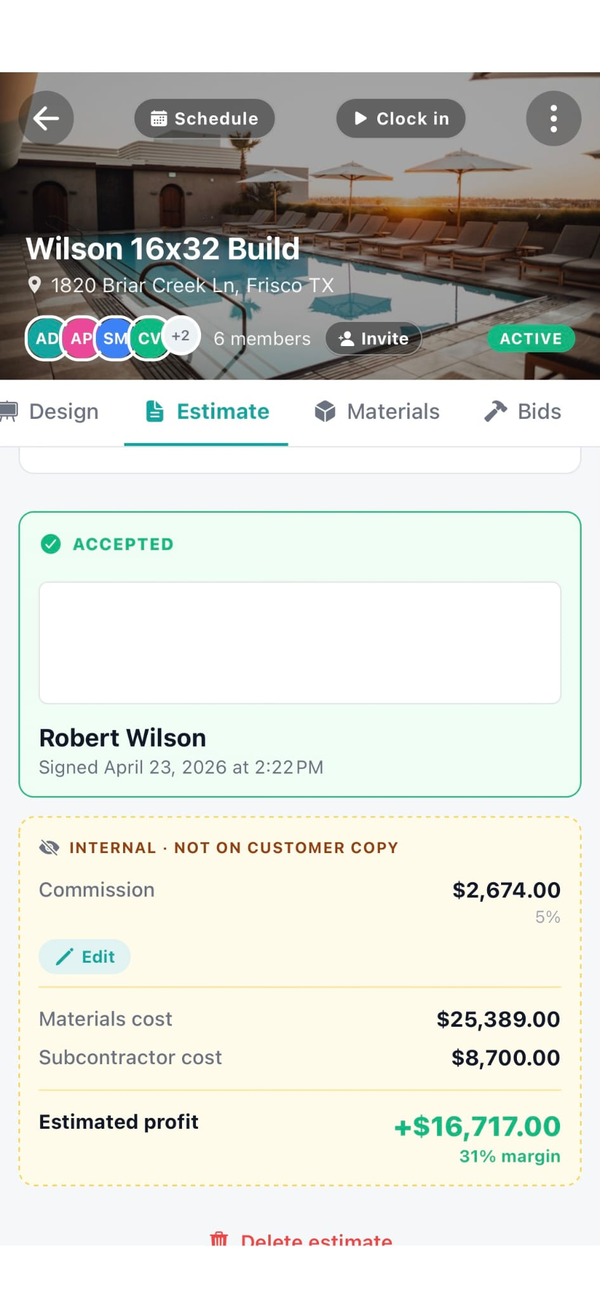
Build the estimate from your catalog. 200A panel, main breaker, individual breakers by amperage, grounding electrode conductor, meter base, weatherhead, copper THHN by gauge, labor. Catalog stores cost and sell separately so margins are visible to you but never on the customer invoice.

Permit pull tracking as a pass-through line

Add the permit fee as a line item flagged pass-through. Customer sees it on the estimate and the invoice as a separate non-marked-up line, with the permit number attached to the job. Inspector reference, install photos, and final invoice all live in one place.

Service-call dispatching and invoicing in one go

Customer calls about a tripping breaker. You create a one-day service job from the phone, log the diagnosis, add parts from your service catalog, tap Invoice, customer gets the Pay Online link before you're back in the truck. Funded to your bank in two business days through Stripe Connect.

Code-compliance photos with GPS and timestamp

Photos taken inside the job auto-stamp date, time, GPS location, and phase tag (rough-in, trim, final). The AHJ wants to see a grounding electrode conductor termination from the permit you pulled in March, you pull it up in one tap.

Residential vs commercial split-billing

Residential service calls bill at your homeowner rate sheet. Commercial work on a tenant fit-out bills at your commercial rate sheet. Workhand stores both per-customer and per-job so the right pricing comes up by default when you start the estimate.

Customer portal for multi-day rewires

Homeowner gets a single link showing job status, today's photos, what's scheduled tomorrow, and balance due. No login. No app install. Cuts the "you guys still coming back?" calls during a week-long rewire to zero.

Subcontractor tracking on commercial jobs

Low-voltage sub, fire-alarm sub, data sub on a tenant buildout. Each comes onto the job with their COI tracked, expiration alerts when their General Liability is about to lapse, and a bid block separate from your own labor. Insurance verification checklist.

Mileage tracking with IRS-rate math

Trips between jobs log automatically. Workhand applies the current IRS mileage rate so the tax deduction is calculated for you. Bookkeeper runs the report in January and the year is done, no spreadsheet rebuild.

What Workhand has that helps electricians

  • Estimates with e-signature and line items. Cost-vs-sell markups stored on every SKU. Customer signs from their kitchen table, job auto-created.
  • Stripe Connect for instant service-call payment. Customer taps Pay Online, funds to your bank in two business days. No more chasing $185 invoices.
  • Permit fee pass-through lines. Show on customer doc as a non-marked-up cost. Permit number attached to the job for AHJ lookup.
  • GPS and timestamp on every photo. Inspector-grade documentation built into the daily log. Tag by phase for fast retrieval years later.
  • Customer portal for multi-day jobs. Homeowner sees status and today's photos through a public link. Pro and Team plans.
  • Subcontractor insurance tracking. COI expiration alerts before the cert lapses. Pro and Team plans.
  • Materials catalog with markups. Cost stays internal, sell prints on the customer doc. Build once, reuse across jobs.
  • Time tracking with active timer banner. Crew clocks in and out from the job, hours roll up to job costing and payroll.
  • Mileage logs with IRS-rate math. Auto-detect trips between jobs, tax deduction calculated by Workhand.
  • QuickBooks Online sync on Team plan. Customers, invoices, payments push to QBO. Bookkeeper sees the week Monday morning.
  • Public profile at workhand.app/c/your-name. Show licensing, COI status, recent reviews. Free SEO leverage for "electrician near me" searches.
  • Customer review collection with Google funnel. Auto-email after job complete. 4-and-5 stars get nudged to Google, 1-3 stars route to private feedback.

See the full feature list for everything else, the QuickBooks alternative writeup, and the FAQ for specifics.

What we are not

Workhand is not a dispatch-first electrical service platform. If your daily flow is a CSR answering phones, a dispatcher dropping 12 calls a day on each tech across a drag-and-drop grid with route optimization, and a price book the techs sell from at the kitchen table, you want ServiceTitan or Housecall Pro. They are built specifically for that motion and they are excellent at it.

We also do not do load calculations, NEC code-section lookup, one-line diagrams, or any engineering. Keep your existing tool (CodeCheck, ConductorPro, the NEC app) for that. Workhand attaches the load-calc PDF to the job so the documentation lives with the work, but we do not generate it.

Workhand is for the residential and light-commercial electrician running a mix of service calls and projects. If pure dispatch service is 80% of your revenue, we are the wrong tool. If panel upgrades, rewires, generator hookups, and commercial fit-outs are how you actually make money with some service calls mixed in, we fit.

Pricing for electricians

Three plans. No per-user fees. No per-estimate fees. Most working electrical contractors land on Pro or Team depending on crew size and whether there's an office.

Free

Solo sparky
$0 / mo
1 active job, 1 user. Try it on one service call or one panel upgrade before paying.

Team

With office staff
$89.99 / mo
Up to 15 team members. Adds job costing, profit per panel/rewire, QuickBooks Online sync, sales pipeline, reports. Right once a bookkeeper or office manager is in the system daily.

Most working electricians pick Pro. Once you hire a second journeyman and an office person to handle billing, you'll outgrow Pro into Team for the job costing and QuickBooks sync. See the FAQ for trial and refund details and the QuickBooks alternative writeup if you're shopping that decision.

Questions electricians ask

Can I track material markups on panel upgrades?

Yes. Build your materials catalog with cost and sell price per SKU (200A panel, breakers by amperage, copper THHN by gauge, fixtures, switchgear). Workhand stores cost and markup separately. The customer estimate shows the marked-up price only. Internal job costing shows the cost so you can see actual margin per job after labor. Cost price stays internal and never prints on the customer invoice.

How does permit fee pass-through work on the invoice?

Add the permit fee as a line item flagged pass-through. The customer sees it as a separate line on the estimate and invoice, no markup applied. You attach the permit number to the job so the inspector reference is in the same place as the install photos. When the AHJ wants documentation, you pull it from one screen.

Can I send an invoice the second a service call is done?

Yes. Finish the troubleshoot, tap Invoice, the line items pull from your service catalog (diagnostic fee, hourly, parts). Customer gets the invoice email with a Pay Online button. Stripe Connect funds to your bank in two business days. See the Stripe Connect setup.

Does Workhand handle inspection-grade photo logs?

Yes. Photos taken inside the job auto-stamp with date, time, and GPS location. Tag them by phase (rough-in, trim, final inspection) and they stay tied to the job for life. When the AHJ asks for a before-and-after on a panel relocation or wants to see grounding electrode conductor terminations, you pull it from your phone or the customer-facing portal.

Can I split a commercial job between my crew and a sub?

Yes. Add subs to the job with their scope (low-voltage, fire alarm, data) and Workhand tracks their COI status and bid versus actuals separately from your own labor. Sub invoices come in against the job for costing. Your crew time tracks against your labor cost. Profit per job comes out clean.

Is Workhand a replacement for ServiceTitan?

If you run a pure-service dispatch shop with 8 to 15 service calls per tech per day, no. ServiceTitan is built around the dispatch grid, call-by-call routing, and price book selling. Workhand is for electricians whose work is a mix of projects (panel upgrades, rewires, new construction rough-in) plus some service calls. The job runs as a project with phases, photos, and a portal, not a one-hour ticket.

Do you do load calcs or code-section references?

No. Workhand is field operations and money flow, not engineering. For load calcs use your existing tool (CodeCheck, ConductorPro, NEC apps). Workhand attaches the PDF of the load calc to the job so the documentation stays with the work.
More reading: Workhand vs ServiceTitan, Workhand vs Housecall Pro, Workhand vs Jobber, the QuickBooks alternative writeup, and the HVAC contractor page if you sub HVAC hookups.

Try it on your next service call. Free plan, no card.

Workhand free plan handles your first job at $0 / month. 14-day full trial on Pro and Team. Cancel anytime in the app.

Download on the App Store Get it on Google Play
Read the full FAQ