Feature · Mobile Estimates

Construction Estimates Built on Your Phone

Walk the job, build the estimate, send it before you pull out of the driveway. Customer e-signs from their phone. Accepted estimate becomes an invoice in one tap. Free to start.

Get Workhand free See pricing
Quick answer: Workhand is a construction estimate app built for the truck, not the desk. Build line-item estimates on a phone or tablet, capture customer e-signature in the app, and convert an accepted estimate to an invoice in one tap. Free plan covers 1 active job. Pro at $34.99/mo unlocks unlimited jobs.

The problem this solves

Customer asks for an estimate at 11am Tuesday after the walkthrough. You promise to have it over by end of day. You can't sit down to QuickBooks until 9pm at the kitchen table after the kids are in bed. By then you are tired, you make a math error, you forget to add the dump fee, and you send it Wednesday morning at 7am instead of Tuesday afternoon.

Meanwhile your competitor sat in their truck after their walkthrough, built the estimate on their phone, and the customer had a signed proposal in their inbox by 1pm Tuesday. By Wednesday morning the customer has already signed with the other guy. You lost a $24,000 job because the other contractor was faster, not because his price was better.

Speed wins estimates. Roughly 50 percent of contracting jobs go to whoever responds first, and the contractor who can build the estimate in the truck before leaving the driveway wins more of them. Not because they hustle harder, but because they have the right tool on the phone in their pocket.

How Workhand handles it

Open the app, tap new estimate, type the customer name. Pull line items from your saved item library (1,000 sq ft pool deck repaint, dumpster, labor by category). Set your deposit percentage, set tax. The math auto-calculates the subtotal, tax, deposit due, and total balance. Add a scope description, add photos from the walkthrough if you want, tap send.

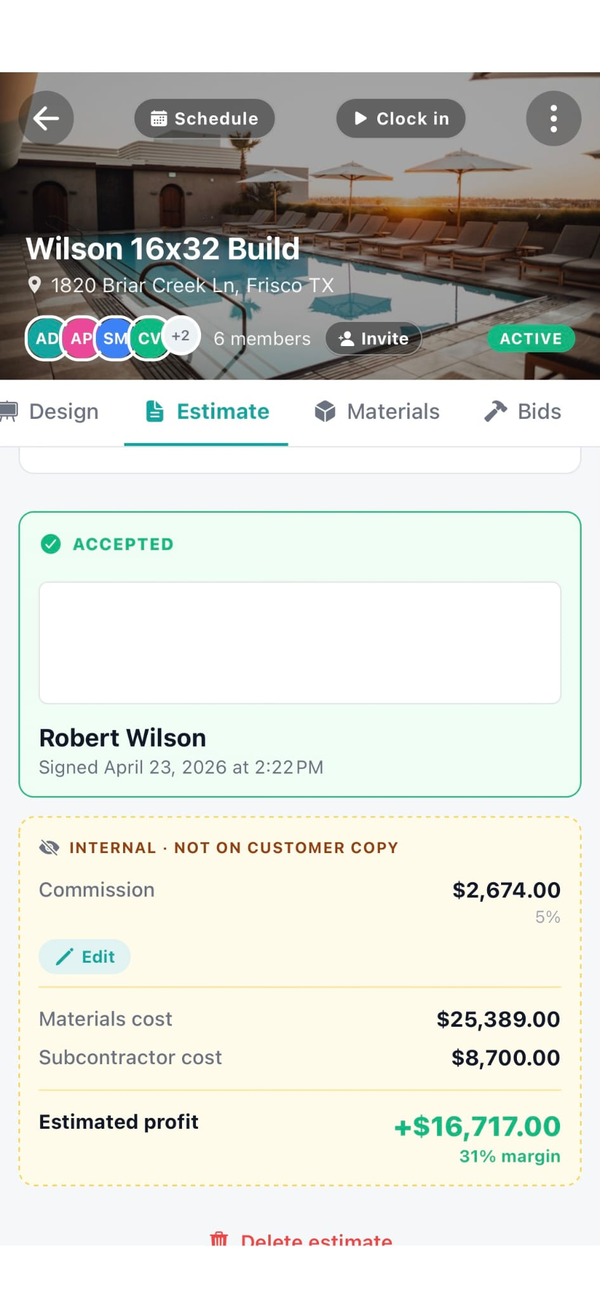
The customer gets a link by text or email. They open it on their phone, review it, type their name, draw a signature with their finger, tap accept. The signed PDF lands in your job record. You convert it to an invoice in one tap when you are ready to bill the deposit.

What you getHow it works
Field-first builderPhone or tablet. No desktop needed. Build the estimate on the truck before leaving the driveway.
Saved item libraryPaint, tile, labor categories, dump fees. Pull repeating line items in seconds.
Auto-mathSubtotal, tax, deposit percentage, and total recalculate as you edit line items.
Customer e-signatureCustomer signs in their browser. No DocuSign or separate signing service required.
One-tap invoiceSigned estimate becomes a deposit invoice with one tap. Scope and line items carry over.
Change ordersAdd a change order line to the same job. Customer signs the change. Flows to the invoice automatically.
Estimate templatesSave common scope formats. Load a template, tweak for this customer, send in 5 minutes.
Send via text or emailTwo taps to send. Customer doesn't need to dig through spam to find a PDF attachment.

Why this matters more than other field features

Most construction software treats estimating as a desktop-first workflow. You collect notes on a clipboard during the walkthrough, drive back to the office, sit down at the laptop, build the estimate, export PDF, attach to email, send. By the time that whole loop closes it is 36 hours later. The customer has already moved on.

Four specific reasons phone-first estimating is bigger than it looks:

  1. Speed equals close rate. The contractor who replies first inside 24 hours wins the job a disproportionate share of the time. Building the estimate before leaving the driveway puts you ahead of 80 percent of your competition.
  2. Math errors die. Auto-calculated subtotal, tax, and deposit means no $400 mistake from a tired kitchen-table session at 10pm. The math is the math, every time.
  3. Templates compound. The first time you write a pool deck repaint scope it takes 45 minutes. Save it as a template. The next one takes 5 minutes. Over a year of 80 estimates, that is 50 hours of your evenings back.
  4. E-signature closes faster. Customers who can sign on their phone in 90 seconds sign at higher rates than customers who have to print, sign, scan, and email back. Removing friction from the accept step closes more jobs.

Who this is built for

Try Workhand free

Free plan includes full estimate functionality on 1 active job. Pro at $34.99/mo unlocks unlimited jobs and up to 5 users. 14-day free trial on paid plans.

Get the app See pricing

Common questions

Can I build a construction estimate from my phone?

Yes. Workhand was built phone-first. Walk the job, add line items from your saved item library, set tax and deposit percentage, and the totals auto-calculate. Send to the customer by email or text before you leave the driveway.

How does customer e-signature work?

The estimate link opens in the customer's browser. They review line items, type their name, draw a signature with finger or mouse, and tap accept. The signed PDF is stored with the job record. No DocuSign account or separate signing service required.

How do I handle change orders?

A change order attaches to the same job as a new line item or a separate change order document. The customer signs the change order the same way they signed the original estimate. The change flows through to the invoice automatically so nothing falls through the cracks at billing time.

Can I save estimate templates for common jobs?

Yes. Save a frequently-quoted scope as a template (for example a pool deck repaint, a roof replacement, a kitchen remodel scope). When the next similar job comes in, load the template, adjust the line items for this specific customer, and send. Cuts estimate-writing time from 45 minutes to 5.

How does converting an estimate to an invoice work?

Once the customer signs the estimate, tap Convert to Invoice on the job. The line items, tax, and deposit carry over automatically. The deposit invoice goes out first, progress invoices and the final balance follow as the job progresses. No re-typing the scope.

What does the estimate look like to the customer?

Clean and branded with your company name. Line items grouped by section if you want (demo, framing, finish). Subtotal, tax, deposit, and total clearly shown. Signature box at the bottom. The customer can accept, request changes, or decline right from the link.

Does Workhand replace QuickBooks for estimates?

For estimating in the field, yes. QuickBooks estimating is desktop-heavy and slow to use on a phone. Workhand sends the estimate in minutes from the truck, then on the Team plan the accepted estimate and its invoice sync back to QuickBooks Online so your bookkeeping stays in one place.

What does the estimate feature cost?

Included on every plan. Free includes 1 active job at a time with full estimate functionality. Pro at $34.99 per month unlocks unlimited jobs for up to 5 users. Team at $89.99 per month covers up to 15 users and adds bidirectional QuickBooks sync. 14-day free trial on paid plans.