The problem this solves
During a pool build, one homeowner sent 47 texts in a single day. Most of them were variations of "any update?", "are the guys coming today?", and "did the tile show up?". Each one needed a thoughtful response or the relationship started to drift. Multiply that by six active jobs and the owner spends three hours a day on update texts and nothing on actually running the business.
The dynamic is predictable. The homeowner has spent $45,000 of their money. They cannot see the jobsite during the day because they are at work. They are anxious because they do not know if work is happening. So they text. The texts are not rude, they are uncertainty showing up as a phone notification.
What does not work: ignoring the texts. The customer escalates, calls the office, leaves a review later about communication. What also does not work: sending a daily update text yourself. That is another job on top of the actual job. After a week the daily texts get skipped and the homeowner starts texting again.
What does work is giving the homeowner a place to go look without having to ask. That is the portal.
How Workhand handles it
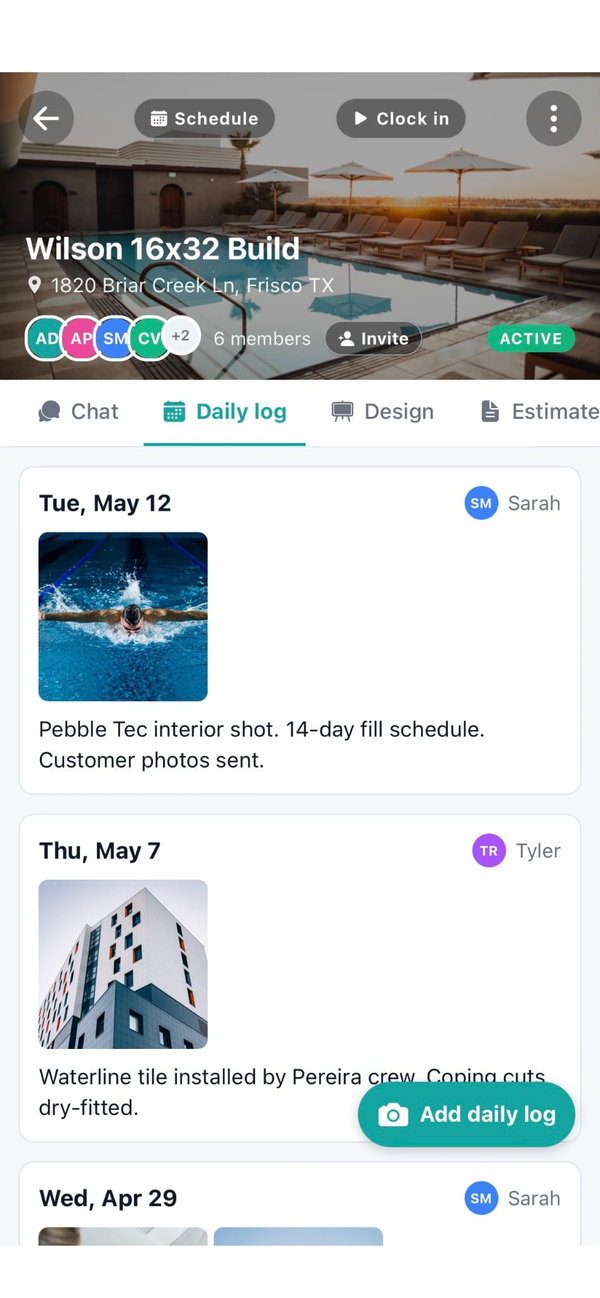
When you create a job, Workhand generates a private portal link tied to that customer and job. You text or email the link once at the start of the project. The homeowner taps it on their phone and lands on a dashboard showing yesterday's photos, today's crew schedule, the next 7 days, the current selections sheet, any pending change orders, and the estimate plus all invoice and payment history.
No account creation, no app download, no password reset later. The link is the access. It is tokenized and private to that customer and job, and you can revoke or rotate it from the job page at any time.
Photos flow in from your crew. When a worker uploads a photo to the job, they pick portal-visible or internal-only with one tap. The portal-visible ones publish to the customer side. Internal team chat never appears in the portal, no matter what setting. Your costs and margin never appear in the portal either.
Change orders get the biggest workflow improvement. You create the change order on the job with a description and price impact. It appears in the portal with a signature field. The customer taps approve, signs with their finger, the signed change order is locked into the job record with a timestamp. The end-of-job "I never agreed to that" fight does not happen because the signature is right there.
| What you get | How it works |
|---|---|
| Private portal link | One link per customer per job. Tokenized URL. No account, no app, no login. |
| Daily photo feed | Crew uploads to the job, picks portal-visible or internal. Portal updates automatically. |
| Live selections sheet | Paint colors, fixtures, tile, finishes. Customer sees current choices and pending items. |
| Schedule view | Today and next 7 days for this job. Updates when you reschedule on the back end. |
| Digital change orders | Customer reviews, signs with their finger, change order is locked into the record. |
| Estimate and invoice history | Full document trail visible. Payment status updates as funds come in. |
| Mobile-first layout | Built for the phone because homeowners check from work, not from a desk. |
| Team chat stays internal | Internal jobsite chat is never visible in the portal under any setting. |
Why this matters more than other field-service features
Customer communication is the single biggest hidden tax on a small contractor's time. The hours a week spent answering update texts do not show up on any invoice, but they crowd out sales calls, estimating, and supervising the actual work. A portal that absorbs 80 percent of the noise pays back fast.
Four specific reasons the portal beats other communication features:
- Asynchronous updates beat synchronous texts. The homeowner gets the answer at 7am over coffee, not from a back-and-forth thread that interrupts your crew supervising the pour. The communication still happens, the friction is gone.
- Signed change orders kill the end-of-job fight. The most expensive arguments in residential construction are about scope changes the customer claims they never approved. Digital signatures in the portal make that conversation a 10-second look-up.
- Reviews go up because confidence goes up. Homeowners who feel informed leave better reviews. The portal is the cheapest confidence multiplier in the business. Same job, same crew, better score because they could see what was happening.
- You scale past six active jobs. Most owner-operators hit a wall around 6 to 8 active jobs because the communication overhead becomes the bottleneck. The portal raises that ceiling without hiring an admin.
Who this is built for
- Pool builders running 8 to 16 week residential builds where homeowner anxiety is highest
- General contractors doing kitchen, bath, and full remodels where homeowners cannot see the site during the day
- Custom home builders on long projects with frequent selections and change orders
- Landscape design-build firms managing multi-phase outdoor projects
- Roofing contractors who want to publish before-and-after photos and final inspection sign-off
- Solo operators who cannot afford to spend three hours a day on update texts
Try Workhand free
Free plan includes a customer portal on 1 active job. Upgrade to Pro at $34.99/mo for unlimited jobs and unlimited customer portals.
Get the app See pricingCommon questions
How does the customer portal work in Workhand?
When you create a job, Workhand generates a private portal link tied to that customer and job. You send the link by text or email. The customer taps it on their phone and sees yesterday's photos, today's schedule, the current selections sheet, any pending change orders, and the estimate plus invoice history. No login, no app to install, just the link.
Does the customer need to create an account?
No. The link is the access. Most homeowners will not download a contractor app for one project, so Workhand uses a tokenized URL instead. The link is private to that customer and that job. You can revoke or rotate it from the job page if you need to.
What does the customer actually see?
Daily progress photos that your crew uploaded, the schedule for today and the next 7 days, the current selections sheet showing paint colors and fixtures and tile and any other choices, any change orders waiting for their signature, and the estimate plus all invoices and payments. They do not see your internal team chat, your costs, or your margin.
How does the portal cut down on customer texts?
Most update texts ask three things. What got done yesterday, when are you coming back, and what are we doing next. The portal answers all three at a glance with the photo feed and the schedule view. Once homeowners trust the portal is current, the texts drop sharply. Most users see roughly 80 percent fewer status check-in texts within a couple weeks.
Can the customer approve change orders from the portal?
Yes. When you create a change order on a job, it appears in the portal with the description, the price impact, and a signature field. The customer taps to approve, signs with their finger, and the signed change order is locked into the job record. No more 'I never agreed to that' fights at the end.
What happens if I do not want the customer to see something?
Photos are opt-in per upload. The crew uploads to the job, then chooses whether each photo is portal-visible or internal only. Selections, schedule, and financial documents are configurable per customer. Internal team chat is never visible in the portal under any setting.
Is the portal mobile-friendly?
Yes. Most homeowners check the portal from their phone while they are at work, so the layout is built phone-first. Photo galleries swipe, schedule is a clean weekly view, change orders are big tap targets. It works fine on a desktop too but the phone is the priority.
How much does the customer portal cost?
Included on every plan, including the Free plan. Free covers one active job, which means one active customer portal. Pro at $34.99 per month covers unlimited jobs for up to 5 users. Team at $89.99 per month covers up to 15 users. There is no per-portal cost and no cap on photos or change orders.