Built for working subcontractors
Most construction software is built from the GC's seat. The sub is an afterthought, if the sub is in the system at all. So the sub workflow gets stuck on group texts, emailed invoices the GC's bookkeeper loses, COI re-uploads every January to every GC you've ever worked with, and three different scheduling apps because each GC uses something different. The whole thing is duct tape.
Workhand is one of the few construction tools that has a real sub side. You can sign up as a sub directly, run your own jobs, invoice your own customers, and operate independently. If a GC who also uses Workhand invites you to one of their jobs, that job just shows up in your existing app. You see only your scope (not the GC's customers, not their costs, not their other jobs). You message the GC and their PM right on the job thread. You upload your COI and W-9 once and every GC who books you sees it. The free plan is genuinely usable for a solo sub running one job at a time.
Workflows we cover
The day-to-day motions of running as a sub, in the order they happen.
Invoice GCs from your phone
Build an invoice on the GC's job (or your own job, if you're running directly with a homeowner). Line items for your scope: labor hours, materials, equipment, subtasks. Email it to the GC with a Pay Online button if you have Stripe Connect.
Upload your COI and W-9 once
General Liability certificate, Workers' Comp (if you carry it), W-9. Upload them to your sub profile. Every GC that invites you sees the documents automatically. Workhand warns you 30 days before any cert expires.
Get paid via Stripe Connect
Connect your bank to Stripe in Settings. Every invoice you send has a Pay Online button. GC pays by card or ACH, money lands in your bank in roughly two business days. Stripe takes their standard processing fee (2.9% + $0.30 for cards in the US). Workhand does not take a cut on top.
Multi-GC job view in one app
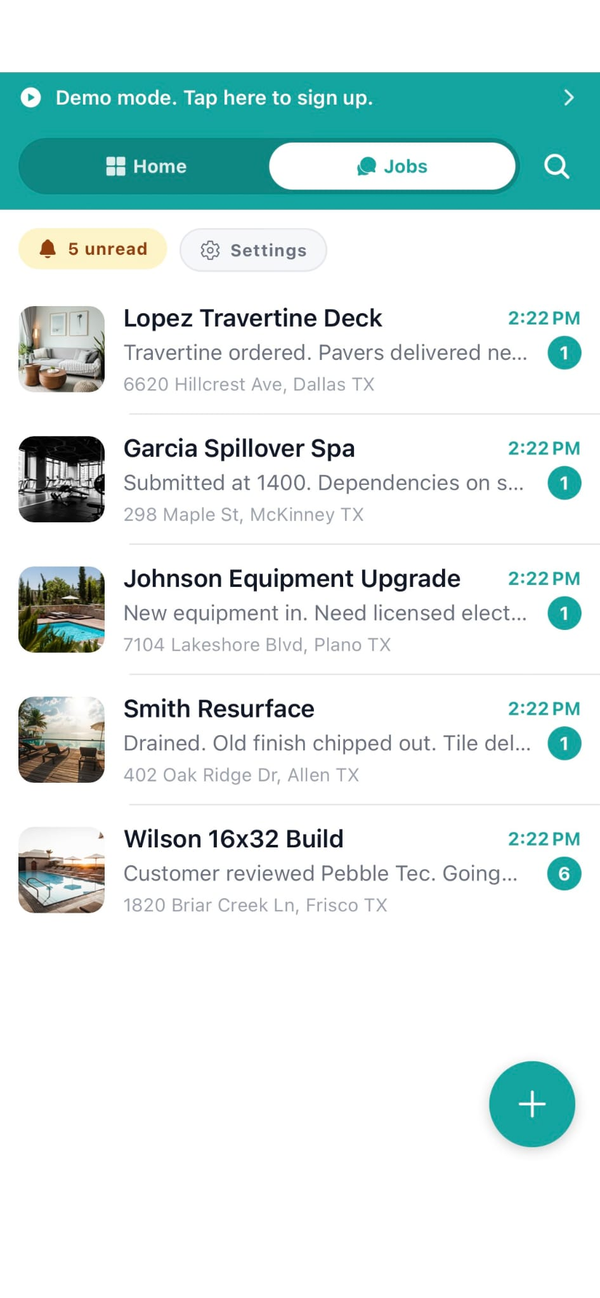
The sub view shows every job you've been invited to across every GC, with status, balance owed, last chat message, and your next scheduled visit. No switching accounts to see which GC's job is on for today.
Message GCs per job
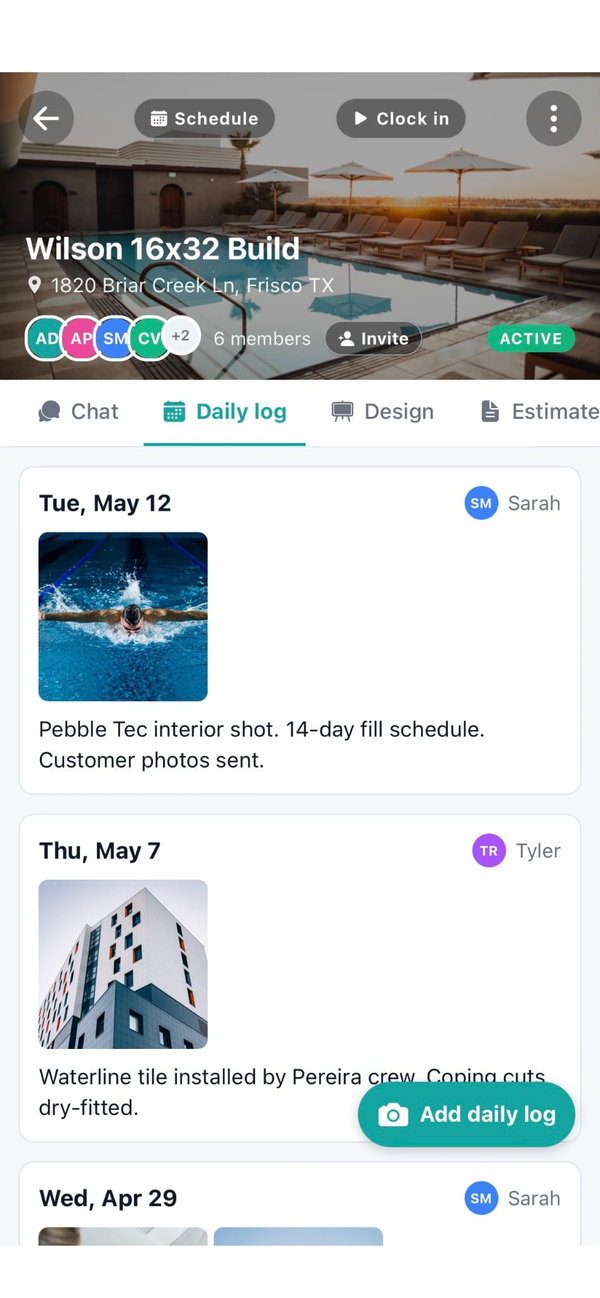
Each GC's job has its own chat thread. You and the GC's office and PM are on the thread for your scope only. No more group text where you have to scroll past cabinet finish questions to find the plumbing rough-in update.
Track your own jobs (the ones you do directly)
Plenty of subs run direct-to-homeowner side jobs alongside GC work. Workhand handles both. Run your own estimates, your own invoices, your own crew chat for the jobs where you're the primary contractor instead of a sub.
1099 ledger for tax time
Every payment in (from GCs and direct customers) and every payment out (to your own subs if you have any) gets logged. January, run the 1099 report and your accountant has what they need. No reconstructing the year from check stubs.
Mileage logs across all your GCs
Trips between job sites log automatically with IRS-rate math. Doesn't matter which GC the job belongs to, all your driving counts toward the deduction. Bookkeeper runs the report in January.
What Workhand has that helps subs
- Free sub account. If a GC who uses Workhand invites you, your account is free as long as you only work on their jobs. No paywall on the sub side.
- One COI upload, every GC sees it. Stop emailing your insurance cert to seven GCs every January. Upload once, GCs see it automatically.
- Invoice GCs from your phone with a Pay Online button. Stripe Connect optional but recommended for fast payment.
- Multi-GC job view. See every active GC job in one list with balance owed, status, next visit.
- Per-job chat scoped to your work. You see only what's relevant to your scope, not the GC's whole project.
- Run your own direct jobs too. Estimates, invoices, crew chat for the jobs where you're the primary contractor.
- Mileage + time tracking across all GCs. Tax deductions calculated for you. One report at year-end.
- Customer-facing portal for your direct jobs. Hero photo, progress, balance due. One link, no login for your customer.
- AI Suggest line items on your direct estimates. Type the scope in plain English and AI builds the line items from your own catalog. Saves the painful blank-line-item start when you bid your own work between GC jobs.
- Documents in English, Spanish, or Portuguese. If you have Spanish-speaking customers on your direct work, send the estimate and invoice in their language. Set per customer.
- Customizable job tabs. GC-invited jobs can be stripped down to just Chat, Daily Log, and Time (the parts subs care about). Your direct jobs can show the full kit. Configure per job.
See the phone invoicing writeup, the Stripe Connect setup guide, and the FAQ for specifics.
What we are not
Workhand does not replace large-GC vendor portals like Procore. If your work is mostly on $5M+ commercial projects where you have to log into a GC's Procore instance to submit pay apps with G702/G703 forms, attach lien waivers, and respond to RFIs, you still have to use the GC's tool for that. Workhand is for the sub running residential and small commercial work where the GC is also on the phone with you, not running an enterprise portal.
We also do not do union payroll calculations, certified payroll reporting, or prevailing-wage compliance. If your work is prevailing-wage public projects (school districts, municipal buildings), you'll need a payroll tool that handles certified payroll. Workhand handles time tracking and mileage but not the certified payroll reporting layer.
Workhand is for the residential and small-commercial sub running direct relationships with GCs and homeowners. Plumbers, electricians, tile setters, framers, drywallers, painters, HVAC subs, roofers, fence installers, deck guys, masons. If that's you, Workhand fits.
Pricing for subcontractors
Three plans. The Free plan is genuinely usable for solo subs. Most working subs running two-plus GC jobs at a time will want Pro or Team.
Free
Pro
Team
Most working subs choose Pro or Team. If you only work directly under GCs who already use Workhand and invite you in, you can run free forever. The Free plan is real, not a trial. See the FAQ for trial and refund details on the paid plans.
Questions subcontractors ask
Is the Free plan really enough for a solo sub?
Yes, in most cases. The Free plan covers 1 active job, 1 user, customers, daily logs, punch list, and per-job chat. If you work one job at a time from end to end, that's enough. Once you're running two GC jobs concurrently, you'll need Pro ($34.99/mo) for unlimited active jobs and sub invoicing.
How does invoicing a GC work?
Build an invoice on the job from your phone. Line items for your scope (labor hours, materials, equipment, subtask). Email it to the GC with a Pay Online button if you have Stripe Connect, or just send the PDF for them to cut a check. Workhand tracks paid versus open so you know exactly which GCs owe you what. See the phone invoicing writeup.
Where does my COI and W-9 live?
Upload them once to your sub account: General Liability certificate, Workers' Comp (if you carry it), and W-9. Every GC that invites you to a job sees the documents automatically. No more emailing your COI to seven GCs every January when it renews. Workhand also warns you when your COI is about to expire.
Can I see all my GC jobs in one place?
Yes. The sub view shows every job you've been invited to across every GC, with status, balance owed to you, last chat message, and your next scheduled visit. You don't have to switch accounts or apps to see which GC's job is in flight today.
Do I need a separate Workhand account if a GC invites me?
No. If you already have a Workhand account, the GC's invite just attaches the new job to your existing account. If you don't have one yet, the invite creates a free sub account for you. Either way, you only run one Workhand account no matter how many GCs use Workhand themselves.
More reading: accepting credit cards with Stripe Connect, QuickBooks alternative for small contractors, or the homepage for the full feature surface.