Feature ยท Job Costing

Per-Job Profit Tracking for Small Construction Crews

See real margin per job. Materials, labor, subs, fuel, and equipment tracked against your estimate in real time. Crew hours roll into labor cost automatically. Photo receipts attach to the cost line. No spreadsheet work at month end.

Get Workhand free See pricing
Quick answer: Workhand tags every cost to a specific job, auto-categorizes it into materials, labor, subs, fuel, equipment, or other, and compares the running total against your estimate. Crew time tracking rolls into labor automatically. You see live gross margin on the job page and a profit dashboard by job type. Included on every plan. Works on iOS and Android.

The problem this solves

A real number from five years of pool construction in Tampa Bay. A pool reno bid at $54,000 with an estimated 35 percent gross margin. Looked solid on paper. Six weeks later when the books closed, real margin was 17 percent. Half what was quoted.

Why the gap. There was $4,200 in last-minute material returns logged as "miscellaneous" on the company card. The deck sub ran a week long because of weather and the extra labor never got coded to the job. About $1,800 in fuel was charged across three trucks and never categorized at all. Pool finish came in $1,100 over what the estimate assumed because the homeowner upgraded the pebble. None of it showed up until the bookkeeper ran the year-end and we tried to reconcile what we actually made.

That is the small-contractor pattern. Costs land in three places that never get rolled back to the job. Material returns hit the credit card statement weeks later. Sub invoices arrive after the job is closed. Fuel and small equipment rentals get coded as miscellaneous in QuickBooks. By the time you see the truth at tax time, you have already used the same flawed pricing on six more jobs.

The duct-tape fix most contractors try: a spreadsheet at the desk. The owner fills it in on Sunday night from the credit card statement. Crew hours get guessed at. Some jobs get tracked, the busy ones do not, and after two months the spreadsheet is abandoned and pricing goes back to gut feel.

How Workhand handles it

Every cost gets logged from the field as it happens. The crew is at the supply house, they snap the receipt, pick the job from a list, pick the category, the cost is on the job rollup before they walk out the door. The photo of the receipt attaches to the cost line so there is no shoebox at the end of the year.

Crew time tracking does the heavy lift for labor. When a worker clocks in to a job, Workhand tags the hours to that job and multiplies by the wage you set for that worker. Labor cost on the job updates in real time. No separate timesheet to enter, no end-of-week labor guessing.

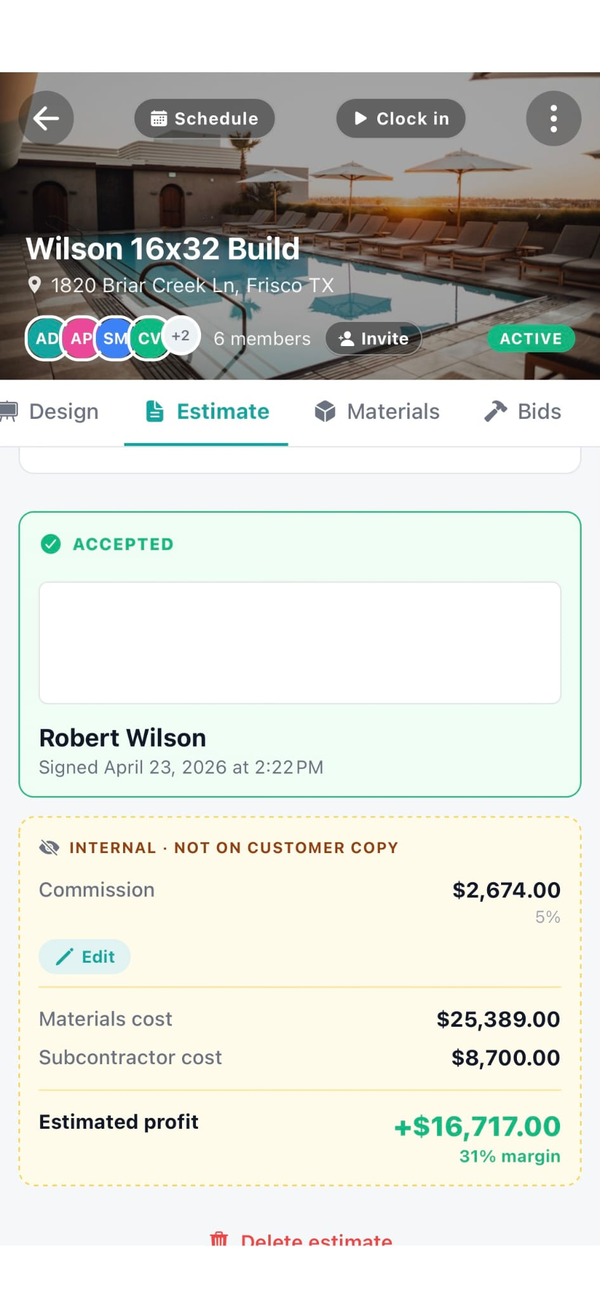
The job page shows the live picture. Estimate at the top, running actuals broken out by category below, gross margin number on the right. When the job closes, the final number is already there. The profit dashboard takes the same data and slices it by today, this week, this month, year to date, and by job type so you can see which work pays.

What you getHow it works
Real-time cost loggingCrew logs costs from the phone, tagged to a specific job, in seconds.
Six cost categoriesMaterials, labor, subs, fuel, equipment, other. Auto-suggested based on description.
Estimate-vs-actual viewEach job page shows estimated total, actual running total, and live gross margin.
Profit dashboardToday, this week, this month, year to date. Sliced by job type so you can price smarter.
Crew time rolls into laborClock-in hours convert to labor cost using each worker's wage. No separate timesheet.
Photo receipts on the lineSnap the receipt at the counter. Photo attaches to the cost. No shoebox at year end.
Late costs land on the right jobSub invoice arrives three weeks after close. Log it on the original job. Profit recalculates.

Why this matters more than other field-service features

Most small contractors price the next job based on what felt about right on the last one. Without a real per-job profit number, the feedback loop never closes. You can be losing money on a whole category of work for years and never know.

Four specific reasons per-job profit visibility moves the needle harder than other features:

  1. Pricing fixes itself when the data shows up. The minute you see that new pool builds are running 22 percent gross while renos are running 31 percent, you reprice the new builds. Six months later the average is up by a category. That is bigger than any savings from a cheaper subcontractor.
  2. Bad jobs get killed before they spiral. When the running total is visible on day six and you are already 80 percent through the budget at 50 percent of the work, you have a chance to renegotiate the change orders before the loss locks in. Without the visibility, you find out at the end.
  3. Cash flow lines up with reality. Knowing the gross on a job lets you set deposits and draw schedules that actually fund the work. Most cash crunches at small construction shops are not revenue problems, they are timing problems caused by guessing the cost.
  4. Owner pay stops being a mystery. When you can see actual gross by job, you can pay yourself a real salary instead of "whatever is in the account." That changes how the whole business gets run.

Who this is built for

Try Workhand free

Free plan includes per-job cost tracking and the profit dashboard on 1 active job. Upgrade to Pro at $34.99/mo for unlimited jobs.

Get the app See pricing

Common questions

How does per-job profit tracking work in Workhand?

Every cost you log gets tagged to a job and a category. Materials, labor, subs, fuel, equipment, and other. Crew hours flow in from time tracking and convert to labor cost using the wage you set per worker. Workhand subtracts the running total from the estimate so you see live gross margin on the job page. When the job closes you see the final number with no spreadsheet work.

Why don't most contractors know their real profit per job?

Costs land in three places that never get rolled up. Material returns hit the credit card statement weeks later. Subcontractor invoices arrive after the job is closed. Fuel and small equipment rentals get coded as miscellaneous in QuickBooks. Without a per-job rollup that pulls every dollar back to the right job, the real margin only surfaces at tax time when it is too late to adjust pricing.

How is this different from QuickBooks job costing?

QuickBooks job costing lives at your desk and depends on your bookkeeper coding every transaction to the right job. Workhand lives in the field. Your crew logs costs on the phone while they are at the job, photo of the receipt attached, category preselected. The data is right the first time. QuickBooks integration is on the roadmap so the cleaned data can sync back to your accountant.

Does crew time tracking roll into job profit automatically?

Yes. When a worker clocks in to a job, the hours are tagged to that job. Workhand multiplies the hours by the wage you set for that worker and the labor cost shows up on the job rollup in real time. No separate timesheet to enter at the end of the week and no labor cost guessing.

Can I see profit by job type, not just per job?

Yes. The profit dashboard slices by job type so you can see, for example, that pool renovations are running 31 percent gross while new builds are running 22 percent gross. That tells you where to push your sales effort and where to raise prices. Most small contractors price every job from gut feel because they have never seen the breakdown.

What happens to material returns and late subcontractor invoices?

Both get logged as cost lines on the job whenever they actually happen. A return is logged as a negative material cost on the original job, so the rollup updates. A sub invoice received three weeks after the job closes still gets tagged to that job and the final profit recalculates. The job is never really closed for accounting purposes until every cost has landed.

Do photo receipts replace keeping the paper?

For day-to-day cost tracking, yes. Snap the receipt at the supply house, the photo attaches to the cost line on the job. For tax purposes most accountants still want originals or a clean digital archive, so plan to keep the paper or set up a regular export. The Workhand photo is your in-field record so the cost is logged before you lose the receipt.

How much does per-job profit tracking cost?

Included on every plan, including the Free plan. Free covers one active job at a time. Pro at $34.99 per month covers unlimited jobs for up to 5 users. Team at $89.99 per month covers up to 15 users. There is no separate add-on for cost tracking or the profit dashboard.